
Getting a passport photo wrong is an easy way to delay your application. GOV.UK warns that your application will be delayed if your photos do not meet the rules. Our wizard turns the official passport photo guidance UK applicants need into a short set of questions. Tell us who the photo is for and how you are applying, and we show only the rules that apply to you.
The wizard works for adults, children and babies, and for online and paper applications. It is an independent guide, so always confirm the details on GOV.UK before you apply.
1. How to Use the UK Passport Photo Guidance Wizard
The wizard takes about a minute. First you choose your applicant type and how you are applying. Then you get a tailored checklist, and you can take or upload a photo to put the advice into practice.
Two rules apply to everyone, whatever your answers:
- Your photo must have been taken in the last month.
- You must get a new photo every time you get a new passport, even if your appearance has not changed.
1.1 Step 1: Upload or Take Your Photo
After you read your guidance, choose a photo from your camera roll or take a new one. GOV.UK lets you take a digital photo on your own device during your application, but you need someone to help you. Ask a friend or family member to hold the camera instead of taking a selfie.
GOV.UK also notes that photos from a booth or shop are an alternative option. If you use a booth or shop, choose the option to get a photo code, which you can enter directly during your online application.
1.1.1 Accepted formats: JPEG, PNG and WebP
Upload a JPEG, PNG, or WebP image directly from your smartphone, tablet, or computer (up to 20 MB). Our tool accepts these standard image formats and prepares a clean, compliant JPEG file ready for upload (at least 600 × 750 pixels and between 50KB and 10MB) or formatted for printing. Note: If your smartphone saves photos in HEIC format, modern mobile browsers convert it automatically, or you can select JPEG in your camera settings before uploading.
1.2 Step 2: Separate Requirements for Digital vs Paper Applications
Digital and printed passport applications have fundamentally different formatting rules. Understanding which format you need ensures your submission goes smoothly:
- Digital Application (Online on GOV.UK): GOV.UK requires an uncropped digital image showing your head, shoulders, and upper body. You must not crop it closely yourself because the GOV.UK online system crops the photo automatically during submission. Your digital file must be at least 600 × 750 pixels, between 50KB and 10MB, in colour, and unaltered by software filters.
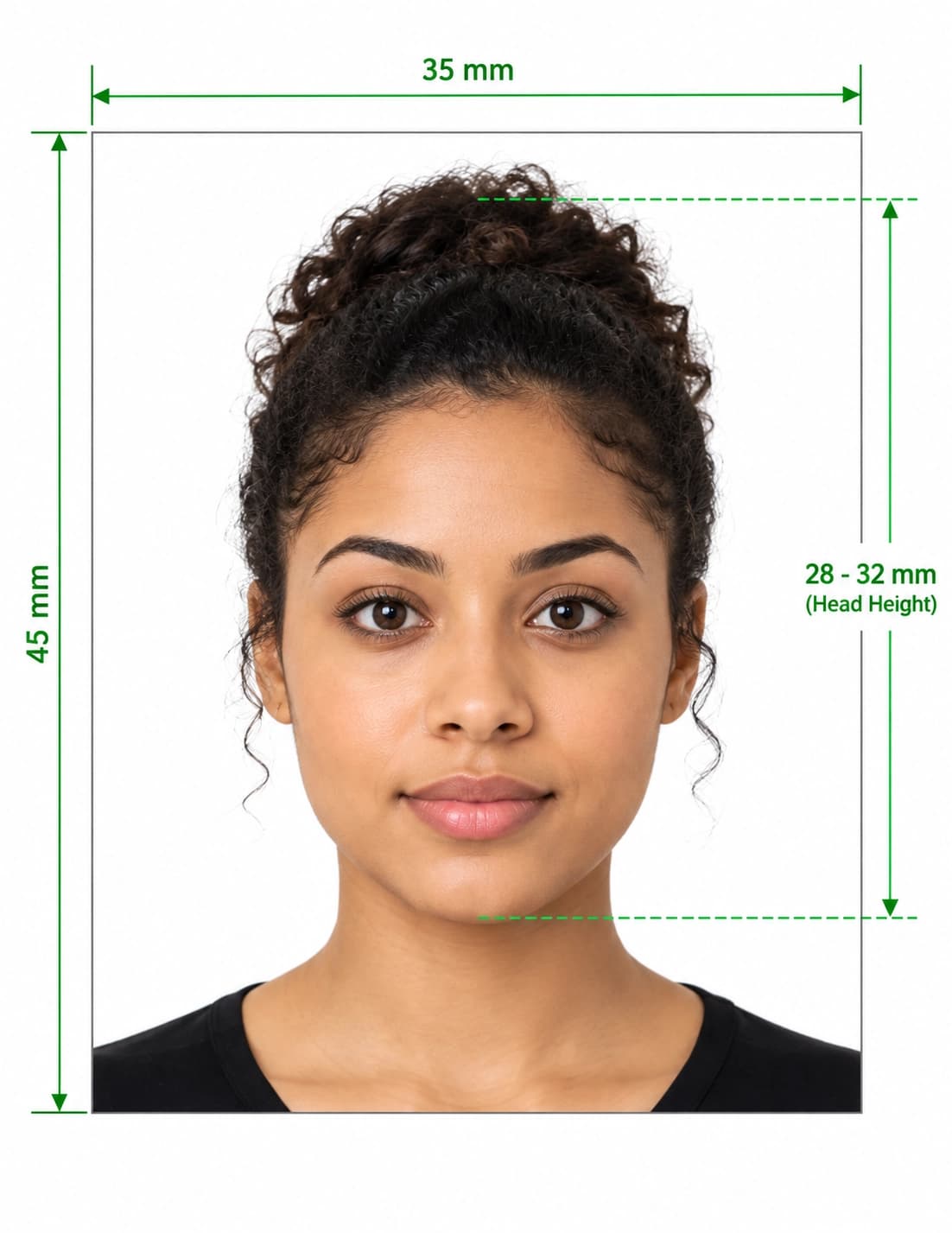
- Paper Application (Printed Form): Paper submissions require 2 identical printed photographs measuring exactly 35 mm wide by 45 mm high. The distance from the crown of your head to your chin must be between 29 mm and 34 mm. They must be printed on plain white photographic paper with no borders.
Our tool checks your photo against official dimensional parameters and creates the exact output tailored to your application method.
1.3 Step 3: Choose Your Download Option
Once your photo has been processed and verified against dimensional rules, select the download option that matches your application:
1.3.1 Digital file and printable sheet options
- Digital Photo (for online applications): Download a single high-resolution JPEG file formatted to meet GOV.UK digital requirements (minimum 600 × 750 pixels) with your original upper-body framing preserved for the official portal upload.
- Printable 6×4″ Sheet (for paper forms): Download a high-resolution 300 DPI 6×4″ (10 × 15 cm) sheet containing multiple identical 35 × 45 mm photos with standard cutting guides. You can print this at home on glossy photo paper or at high-street photo kiosks (Boots, Tesco, Asda) without cutting down an arbitrary snapshot.
2. Guidance for Every Applicant Type
The rules below follow the published GOV.UK guidance. If you searched for passport photo standards UK applicants must meet, or for a biometric passport photo UK officials will accept, this is the information you need. GOV.UK does not use the word "biometric" for its photo rules. It publishes them as rules for digital photos and for printed photos.
| Rule | Digital photo (online application) | Printed photos (paper application) |
|---|---|---|
| How many | One digital photo | 2 identical photos |
| Size | At least 600 × 750 px | 45 mm high × 35 mm wide |
| File size | At least 50KB, no more than 10MB | Not applicable |
| Head & framing | Upper body & shoulders included (portal auto-crops) | Crown to chin between 29 mm and 34 mm |
| Paper / Output | JPEG file upload | Plain white photographic paper, no border |
| Background | Plain and light-coloured | Plain cream or light grey |
| Quality | Clear, in focus, in colour | Clear, in focus, in colour, printed to a professional standard |
| Editing | Unaltered by computer software | Unaltered by computer software |
2.1 Adults and Older Children
Adults and children aged 6 and over follow the same pose rules. In your photo you must:
- face forwards and look straight at the camera
- have a plain expression and your mouth closed
- have your eyes open and visible
- have no shadows on your face or behind you
- have nothing covering your face
The photo must also contain no other objects or people, and it must not have "red eye". The background must be in clear contrast to you, so avoid a light top against a light wall.
2.1.1 Glasses, hair and jewellery
- Glasses: GOV.UK says not to wear glasses unless you have to. If you must wear them, they cannot be sunglasses or tinted glasses, and your eyes must not be covered by the frames or by any glare, reflection or shadow.
- Hair: Keep hair away so none falls in front of your eyes.
- Jewellery: GOV.UK does not list jewellery on its photo pages. The rule that covers it is that nothing may cover your face and there must be no shadows, so remove anything that does either.
2.1.2 Head coverings for religious reasons
GOV.UK says you must not wear a head covering in your photo unless it is for religious or medical reasons. Your face must still be fully visible, with nothing covering it and no shadows across it. If you need extra support with your photos, GOV.UK offers help with passport photos if you are disabled.
2.2 Babies and Special Circumstances
Different rules apply to young children, and the wizard shows the right ones for the age you enter.
- All children: The child must be on their own in the picture.
- Babies: They must not hold toys or use dummies.
- Children under 6: They do not have to look directly at the camera or have a plain expression.
- Children under one: They do not have to have their eyes open. You can support their head with your hand, but your hand must not be visible in the photo.
- Lying down: Children under one should lie on a plain light-coloured sheet, and you should take the photo from above.
3. Why Use Our UK Passport Photo Guidance Wizard?
Official guidance is accurate but comprehensive, and the rules differ for digital and printed photos, for adults and for babies. The wizard saves you reading all of it.
3.1 Personalised Guidance in 60 Seconds
Answer a few questions about the applicant's age, how you are applying (online or paper form), and whether you wear glasses or a head covering. You receive a short checklist covering only the rules that matter to you. You can run the wizard again for each family member.
3.2 Links Straight to the Photo Maker
When you finish, move to our photo maker with your answers saved. Use it to prepare your picture, or go to our UK passport photo checker to test it against the rules. If you are renewing, read our UK passport renewal photo guide, and for tips on taking your own picture, see our guide to taking a passport photo at home.
Start Your UK Passport Photo Guidance
Answer a few quick questions to get your personalised passport photo checklist in about a minute, or upload your photo directly to test it against official standards.
Important Notice: PixPassport is an independent service and is not affiliated with HM Passport Office or GOV.UK. We help you check and prepare your photos against official dimensional standards, but the issuing authority always makes the final decision on every passport application.
Frequently Asked Questions
Everything you need to know about official Passport Photo Guidance UK: Your Step-by-Step Wizard requirements and specifications.
Where can I find official UK passport photo guidance?
The official guidance is on GOV.UK, on the "Get a passport photo" pages. They cover digital photos and printed photos, with separate rules for babies and children. We base this wizard on those pages, but we are an independent service and not affiliated with GOV.UK or HM Passport Office.
What are UK biometric photo standards?
People often search for a biometric photo UK passport applicants can use, meaning a photo that meets the passport rules. GOV.UK sets out those rules as quality, size and appearance requirements. Your photo must be clear, in focus, in colour and unaltered, with a plain light background, a forward-facing pose, a plain expression with your mouth closed, and your eyes open and visible. A digital photo must be at least 600 × 750 pixels and between 50KB and 10MB.
Do the standards differ for children?
Yes. The size and background rules stay the same, but the pose rules relax for young children. Children under 6 do not need to look at the camera or keep a plain expression, and children under one do not need to have their eyes open. A child must always be on their own in the picture, and babies must not hold toys or use dummies.
Can I take my digital passport photo on a phone?
Yes. You can take a clear, high-resolution photo on your smartphone or digital camera with a friend helping you (no selfies). Ensure even lighting, look straight ahead with a neutral expression, and our tool will verify framing and compliance before you submit.
Do I need to print my digital passport photo?
No, if you are applying online through GOV.UK, you only need the digital photo file. If you are completing a physical paper form, you need 2 identical 35 × 45 mm prints on white photographic paper.
Ready to create your verified Passport Photo Guidance UK: Your Step-by-Step Wizard?
Prepare your photo using UK passport photo requirements and review it before submitting your application.
Upload Photo & Create Now