
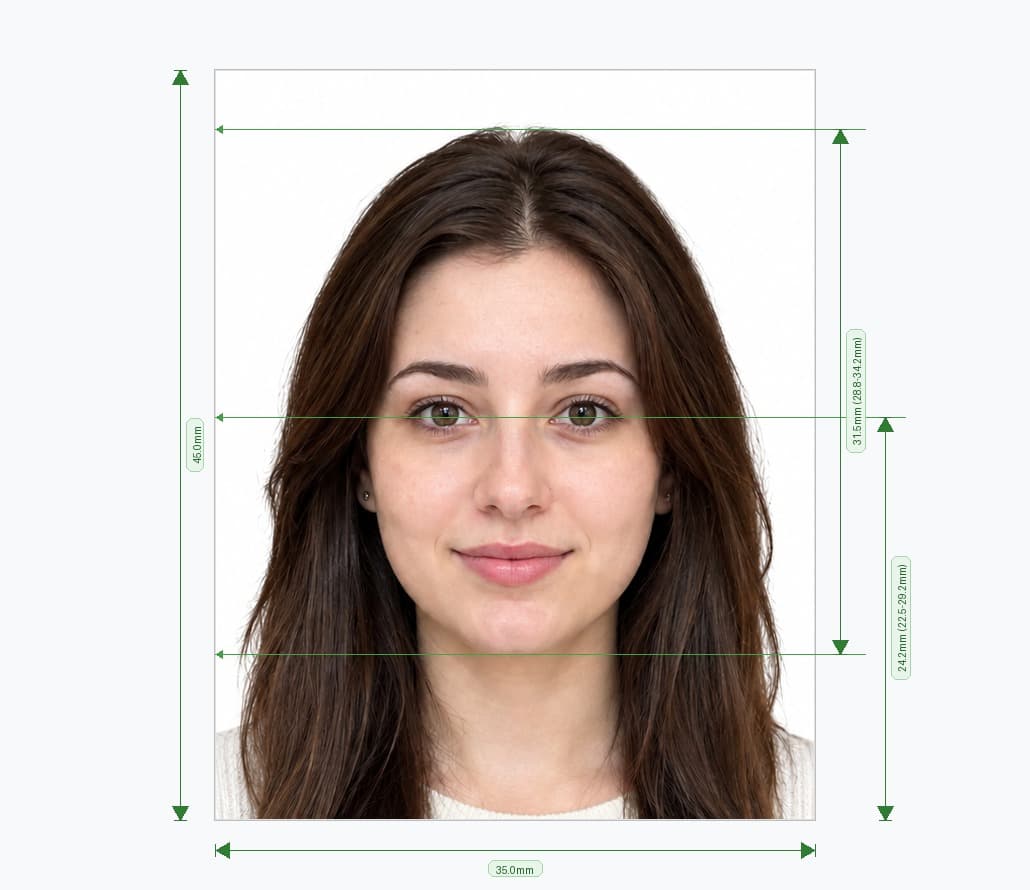
Get a Digital Photo for Your Online Passport Renewal
You do not need a photo booth to renew your passport online. Take a picture on your phone, upload it to our editor, and the tool crops it to 35×45 mm, replaces the background with a plain light one and checks your head size. You can then download a digital file and upload it with your application on GOV.UK.
Renewing online is quicker than posting a paper form, and a correct photo is the part most applicants get wrong. Prepare it at home first, and your application runs smoothly.
How to Make a Passport Renewal Photo Online in 4 Steps
- Upload your picture. Choose a recent, sharp, front-facing photo from your phone or computer.
- Let the tool crop it. The editor centres your head and sets the 35×45 mm frame.
- Review the checks. The tool tests your background, head size and framing.
- Download your digital photo. Save the JPEG, then upload it when the renewal service asks for it.
The whole process takes about two minutes, and you can retake the picture as often as you like.
Passport Renewal Photo Requirements for Online Applications
The online service applies the same standard as a paper application. Check these rules before you take your picture.
| Requirement | Standard |
|---|---|
| Format | JPEG, in colour, with no filters or retouching |
| Size | 35 × 45 mm, at least 600 × 750 px |
| Head size | 29 to 34 mm from chin to crown |
| Background | Plain cream or light grey, with no shadows |
| Photo age | Taken within the last month |
| Expression | Neutral, with eyes open and mouth closed |
Background and Lighting
- Use a plain cream or light grey background. White is not accepted.
- Keep shadows off your face and the wall. Even lighting matters more than any camera.
- Keep the frame clear. Other people, furniture and patterns cause rejections.
Pose and Expression
- Face the camera. Look straight at the lens with your head level.
- Keep a neutral expression. Close your mouth and keep your eyes open.
- Clear your face. Move hair away from your eyes and eyebrows.
Glasses, Headwear and Appearance
- Remove your glasses. HMPO accepts them only in limited medical cases, and sunglasses or tinted lenses never pass.
- Wear headwear only for religious or medical reasons. Show your full face from chin to forehead.
- Look like yourself today. A photo that no longer matches your appearance can cause delays.
Why Renewal Photos Get Rejected
Small mistakes cause most delays, so know what to avoid.
| Accepted ✅ | Rejected ❌ |
|---|---|
| Cream or light grey background | White, dark or patterned background |
| Neutral face, mouth closed | Smiling, laughing or frowning |
| Both eyes open and visible | Hair across the eyes, or glare on lenses |
| Sharp, well-lit colour photo | Blurry, grainy or filtered picture |
| Full head, neck and shoulders | Cropped hair or an extreme close-up |
| Photo taken in the last month | Old photo that no longer looks like you |
What You Get With Our Passport Renewal Photo Tool
Our online tool handles each step and helps you avoid these mistakes.
- Automatic cropping: The editor sets the 35×45 mm frame around your face.
- Background replacement: It swaps your wall for a plain light background.
- Head-size check: It compares your head height with the 29–34 mm range.
- Picture converter: Turn an existing photo into a renewal-ready digital photo without a retake.
- Phone-friendly editing: Use any smartphone and finish in your browser.
- Digital and print output: Download a JPEG for upload, or a sheet with copies to print if you post your form.
How to Take a Better Source Photo
A clear picture gives the cleanest result, so take a few minutes to set up.
- Ask someone to help. Selfies distort your face, so have a friend hold the camera at eye level.
- Face a window. Soft daylight removes shadows from your face.
- Stand about one metre from the camera. Keep the lens level with your eyes.
- Use a plain wall. A simple backdrop gives a sharper background cut-out.
- Leave space around your head. The tool needs room to crop correctly.
- Look straight ahead. Relax your face and keep your head level.
How to Upload Your Photo When You Renew Online
Before You Start
Gather your current passport, a payment card and your digital photo. Have your passport details to hand, because the online service asks for them.
During the Application
- Start your renewal on GOV.UK and complete the personal details section.
- Upload your JPEG when the service asks for a photo.
- Read the automatic photo check result, and follow any advice it gives.
- Confirm your details, pay by card and submit your application.
The service checks your photo as you upload it and warns you about common problems. If it flags an issue, retake the picture or adjust it in our editor, then upload it again.
If You Prefer a Paper Form
Some applicants renew by post instead. Print two identical 35×45 mm photos on plain white photo-quality paper, with no borders. Follow the form's instructions, because some applications need a countersignature on the back of one photo.
Digital Photo vs Printed Photo for Renewal
| Digital photo | Printed photo | |
|---|---|---|
| Best for | Online renewal on GOV.UK | Paper application by post |
| File or print | JPEG, at least 600×750 px | Two 35×45 mm prints |
| Automatic check | Yes, when you upload | No, so check it yourself |
| Cost | Low, with no printing | Printing cost per set |
Renewing for a Child?
Children need the same size and background, but HMPO relaxes some rules for young ones. Babies do not need to look at the camera, and no one else may appear in the photo. Check the GOV.UK guidance for children before you apply.
Other Photo Formats
Need a different document? Use our UK passport photo maker for first-time and general applications, our UK driving licence photo maker for DVLA forms, or our US visa photo maker for the square 2×2 inch format.
Get Your Passport Renewal Photo Now
Upload your picture, and get a correctly sized digital photo for your online passport renewal in minutes. No studio visit and no editing skills needed.
Frequently Asked Questions
Everything you need to know about official Online Passport Renewal Photo Maker requirements and specifications.
Can I upload my own photo for online passport renewal?
Yes. Take a clear, front-facing picture that meets the passport photo rules, or prepare it in our editor, and upload it during your application.
What size is a digital photo for passport renewal?
The photo measures 35 × 45 mm, and the digital file needs at least 600×750 pixels. Save it as a JPEG.
What background do I need for a passport renewal photo?
Use a plain cream or light grey background with no shadows or patterns. White is not accepted, and our tool replaces your background automatically.
Can I take my passport renewal picture with a phone?
Yes. Take a clear picture in even daylight, upload it to the tool, and download the finished digital photo.
Can I wear glasses in my renewal photo?
Take them off. HMPO accepts glasses only in limited medical cases, and sunglasses are never acceptable.
How recent must the photo be?
Take it within the last month, and make sure it looks like you today.
Do I need a printed photo for online renewal?
No. The online service asks for a digital photo, so you do not need to print anything or post a copy.
What happens if my renewal photo fails the check?
The service warns you about the problem. Fix the issue, such as the background or lighting, and upload a new file.
Ready to create your verified Online Passport Renewal Photo Maker?
Upload your photo in seconds and receive guaranteed HMPO / ICAO compliant digital photos and printable sheets.
Upload Photo & Create Now