
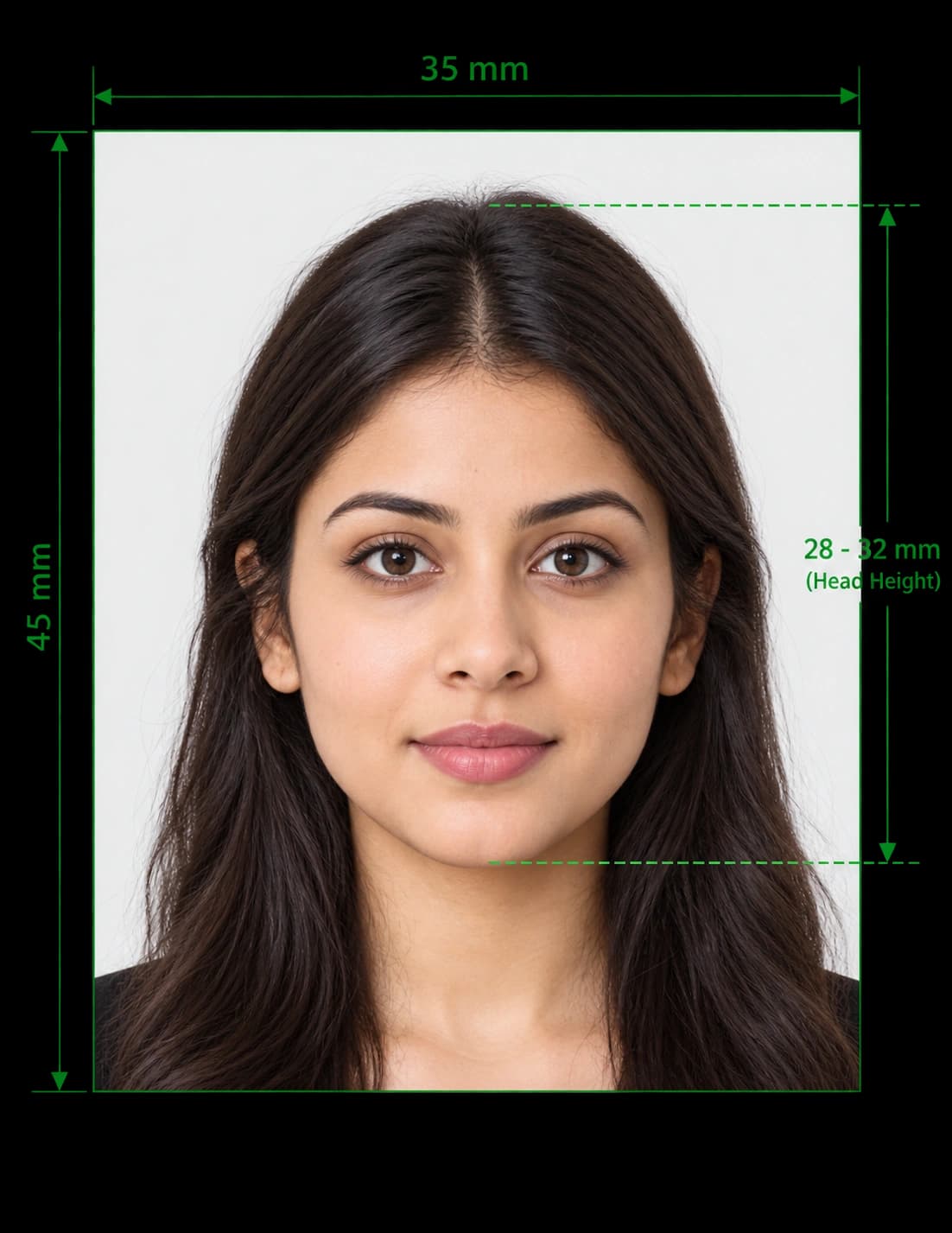
Make a 35x45 mm Photo Online in Minutes
You do not need a studio to get a 35×45 mm photo. Upload a picture from your phone, and our tool crops and resizes it to the 35 x 45 mm format. It also replaces the background and checks that your head fits the required range.
Download the file for printing or online upload. The whole process takes about two minutes, and you can retake the picture as often as you like.
How to Crop a Photo to 35x45 mm in 4 Steps
- Upload your picture. Choose a clear, front-facing photo from your phone or computer.
- Select the 35×45 mm format. The tool sets the correct frame and aspect ratio.
- Review the checks. The editor centres your face, removes the background and tests your head size.
- Download your photo. Save a digital file, or a print-ready sheet with several copies.
35×45 mm in Other Units
Forms and websites quote the same size in different units. Use this table to convert:
| Unit | 35×45 mm photo size |
|---|---|
| Millimetres | 35 × 45 mm |
| Centimetres | 3.5 × 4.5 cm |
| Inches | About 1.38 × 1.77 in |
| Pixels at 300 DPI | About 413 × 531 px |
| Pixels at 600 DPI | About 827 × 1063 px |
| Aspect ratio | 7:9 |
Some online portals ask for a specific pixel size instead. For example, India asks for 630×810 px, and the UK asks for at least 600×750 px. Both keep the 7:9 ratio. Always check the upload page before you submit.
Which Countries Accept 35×45 mm Photos?
Many countries use the 35×45 mm format for passports. Here are common examples:
| Region | Countries and documents |
|---|---|
| United Kingdom and Ireland | UK passport and driving licence, Irish passport |
| European Union and Schengen area | Most EU member states for passports, ID cards and Schengen visas |
| Rest of Europe | Norway, Switzerland and Russia for passports |
| Asia-Pacific | India, Japan and Singapore for passports |
| Oceania | Australia and New Zealand for passports |
| Africa | South Africa for passports |
This list is not complete, and rules vary by document. A country may use 35×45 mm for passports but another size for visas or ID cards, so always check the official requirements.
Same Size, Different Rules
Two countries can use the same 35×45 mm size and still set different rules. Check these points for your country:
- Head size: The range varies, for example 29–34 mm in the UK and a larger share of the frame in India.
- Background colour: Some countries ask for white, others for cream or light grey.
- Photo age: Limits range from one month to six months.
- File format and size: Online portals set their own limits.
For country pages, see our guides to the UK passport photo and the Indian passport photo.
Countries That Use a Different Size
Do not use 35×45 mm for these formats:
| Country | Typical size |
|---|---|
| United States | 2 × 2 in (51 × 51 mm), square |
| Canada | 50 × 70 mm |
| China | 33 × 48 mm |
Use our US visa photo maker for the square US format.
35×45 mm Photo Requirements That Apply Almost Everywhere
Most authorities that use this size follow the ICAO principles. Get these right, and you avoid most rejections.
Pose and Expression
- Face the camera. Look straight at the lens with your head level.
- Keep a neutral expression. Close your mouth and keep your eyes open.
- Show your full face. Move hair away from your eyes, and keep your face uncovered from chin to forehead.
Background and Lighting
- Use a plain background. Check whether your country wants white, cream or light grey.
- Avoid shadows. Light your face and the wall evenly.
- Keep the frame clear. Other people, objects and patterns cause rejections.
Glasses, Headwear and Editing
- Remove your glasses. Many countries no longer accept them, except for documented medical reasons.
- Wear headwear only for religious or medical reasons. Show your full face.
- Do not retouch the photo. Filters, smoothing and heavy editing lead to rejection.
What You Get With Our 35x45 mm Photo Tool
- Exact cropping: The editor sets the 35×45 mm frame around your face.
- Background replacement: It swaps your wall or room for a plain background.
- Head-size check: It measures your head against the official range.
- Photo converter: Turn an existing picture into a 35×45 mm photo without a retake.
- Phone-friendly design: Upload straight from your camera roll.
- Digital and print output: Download a JPEG, or a sheet with several copies.
If you already have a picture, our image to passport size converter explains which pictures convert well.
How to Print a 35x45 mm Photo
Printing is where many photos go wrong. Follow these steps for an exact size.
- Download the print sheet. Choose the 6 × 4 inch (10 × 15 cm) layout.
- Load photo paper. Use glossy or matt photo paper, not plain office paper.
- Choose the highest quality setting. Select "photo" or "best" in your printer settings.
- Print at 100% scale. Turn off "fit to page", or the size will change.
- Measure the result. Check one photo with a ruler for exactly 35 × 45 mm.
- Cut along the guides. Use a trimmer or sharp scissors for straight edges.
For more tips, read our guide to taking a passport photo at home.
Common 35x45 mm Photo Mistakes
| Mistake ❌ | Fix ✅ |
|---|---|
| Cropping by eye | Use a tool that sets the exact ratio |
| Stretching the image | Crop the photo, and do not stretch it |
| Printing with "fit to page" | Print at 100% scale |
| Head too small in the frame | Move closer, and let the tool crop the photo |
| Wrong background colour | Check your country's rule first |
| Using an old or filtered picture | Take a fresh, untouched picture |
| Uploading a HEIC or PNG file | Save as a JPEG |
Make Your 35x45 mm Photo Now
Upload your picture, and download a correctly sized 35×45 mm photo in minutes. No studio visit and no editing skills needed.
Frequently Asked Questions
Everything you need to know about official 35x45 Photo Size Online requirements and specifications.
What is 35x45 mm in cm?
It is 3.5 × 4.5 cm. In inches, it is about 1.38 × 1.77.
How do I crop a photo to 35x45 mm online?
Upload your picture, select the 35×45 mm format, and let the tool crop it. Then download the finished file.
Is there a free 35x45 mm photo tool online?
You can upload your picture and preview the result before you download. The final file is a paid download, so confirm the current terms in the editor.
How many pixels is a 35x45 mm photo?
At 300 DPI, it is about 413 × 531 pixels. Some portals ask for a set size, such as 630×810 pixels for India.
Is 35x45 mm the same as passport size?
In many countries, yes. The UK, EU, India, Japan, Singapore and Australia all use it for passports. The US and Canada use different sizes.
Can I use a 35x45 mm photo for a visa?
Sometimes. Schengen visas often use it, but many visas use another size, so check the official requirements.
Can I convert a photo to 45mm x 35mm?
Yes. Upload your picture, and the tool crops it to the 35×45 mm portrait format. Do not rotate it, because passport photos use a tall frame.
Will my photo definitely be accepted?
No tool can promise that. The issuing authority makes the final decision, but our checks help you avoid the most common mistakes.
Ready to create your verified 35x45 Photo Size Online?
Upload your photo in seconds and receive guaranteed HMPO / ICAO compliant digital photos and printable sheets.
Upload Photo & Create Now