
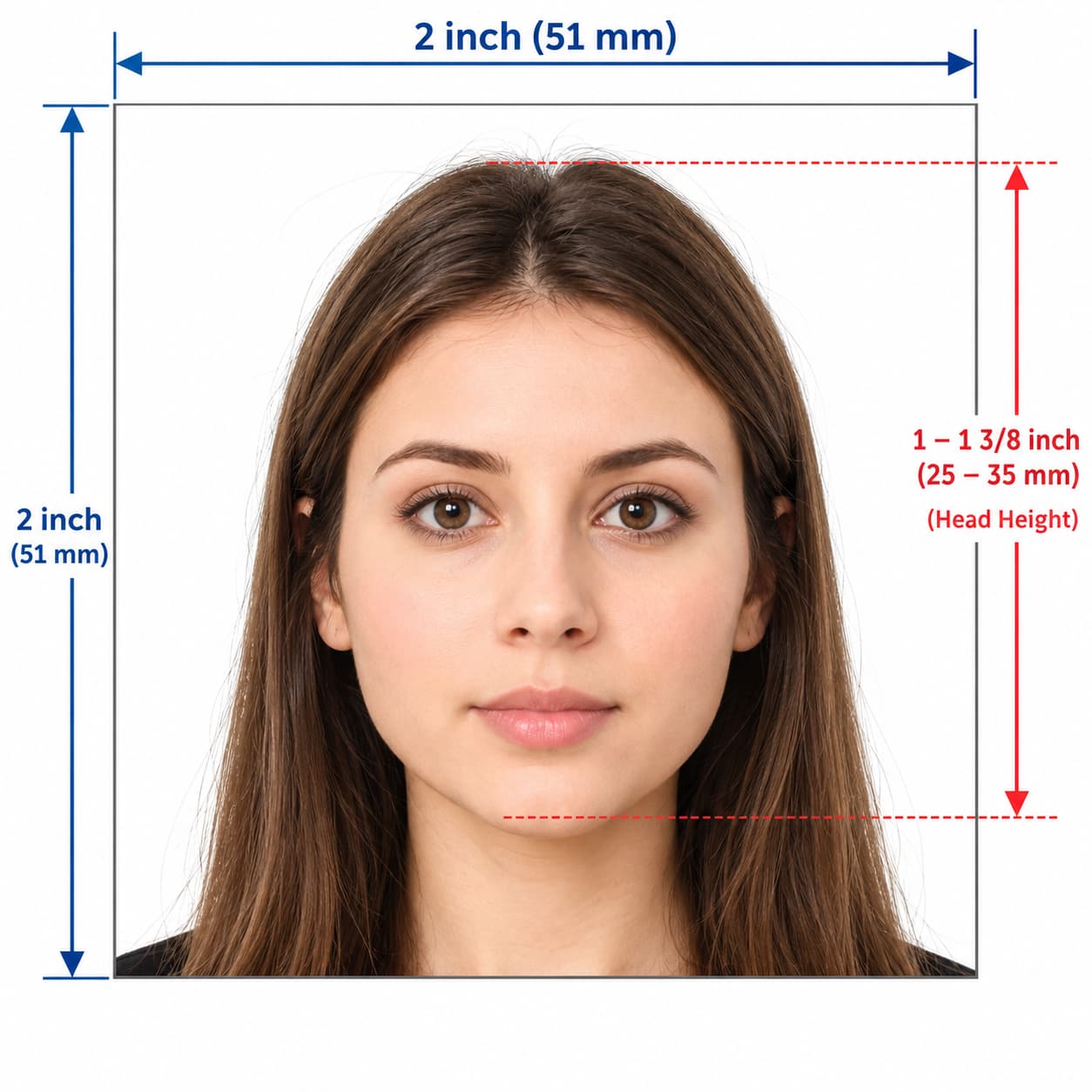
Make a US Visa Photo Online in Minutes
You do not need a studio to get a correct US visa photo. Upload a picture from your phone, and our US visa photo maker crops it to the square 2×2 inch format, replaces the background with white, and checks your head size against the State Department range.
Use this tool for a US visa application, a passport application, or a passport renewal. Download a 600×600 px JPEG for online upload, or print the photo at home or at a local shop.
How the US Visa Photo Editor Works
- Upload your picture. Choose a clear, front-facing photo from your phone or computer.
- Let the tool crop it. The editor centres your face and converts the image to a 1:1 square.
- Check the result. The tool removes the background and shows whether your head size fits the rules.
- Download your photo. Save a digital JPEG for your application, or a print-ready sheet.
The whole process takes about two minutes, and you can retake the photo as often as you like.
US Visa Photo Requirements at a Glance
The US Department of State sets one photo standard for visas and passports. Check these rules before you take your picture.
| Requirement | US standard |
|---|---|
| Print size | 2 × 2 inches (51 × 51 mm) |
| Digital size | 600×600 to 1200×1200 px, square |
| File format | JPEG, in colour, under 240 KB |
| Head size | 1 to 1 3/8 inches (25–35 mm), about 50–69% of the image height |
| Background | Plain white or off-white, with no shadows |
| Photo age | Taken within the last 6 months |
Detailed US Photo Guidelines
Size, Format and Quality
- Keep the image square. A rectangular or stretched photo fails the upload check.
- Stay within the pixel range. Use at least 600×600 px and no more than 1200×1200 px.
- Submit a real photograph. Do not scan an old print, and do not use a filtered or edited image.
- Use a colour photo. Black-and-white images fail.
Pose and Expression
- Face the camera. Look straight at the lens, with your head level and both eyes open.
- Keep it natural. Use a neutral expression or a natural, unforced smile.
- Show your full face. Keep hair, hands and objects away from your eyes and face.
Glasses, Clothing and Head Coverings
- Remove your glasses. The State Department no longer accepts glasses in visa or passport photos.
- Wear everyday clothing. Avoid uniforms and camouflage patterns.
- Wear head coverings only for religious or medical reasons. You may need a signed statement, and your full face must stay visible.
What to Do vs What to Avoid
| Do this ✅ | Avoid this ❌ |
|---|---|
| Use a square 1:1 photo (600×600 px or 2×2 in) | Cropping to a rectangle or stretching the image |
| Take the photo without glasses | Wearing glasses, tinted lenses or sunglasses |
| Use a plain white or off-white background | Textured walls, patterns or shadows |
| Look straight at the camera at eye level | Tilting your head up, down or sideways |
| Light your face evenly | Glare, harsh shadows or a dark, grainy image |
| Use a recent photo | Submitting a photo older than 6 months |
What You Get With Our US Visa Photo Maker
Our online tool handles each step, so you avoid the common mistakes.
- Automatic square crop: The editor sets the 2×2 inch frame around your face.
- Background removal: It replaces your wall or room with a clean white background.
- Head-size check: It measures your head against the US range.
- Picture converter: Turn an existing photo into a US visa picture without a retake.
- Phone-friendly editing: Use any smartphone and finish in your browser.
- Digital and print output: Download a JPEG for upload, or a sheet with several copies to print.
How to Take a Good Source Photo
A clear picture gives the cleanest result, so take a few minutes to set up.
- Ask someone to help. Selfies distort your face, so use the rear camera and have a friend hold it at eye level.
- Face a window. Soft daylight removes shadows from your face.
- Stand about three feet from the camera. Keep the lens level with your eyes.
- Stand in front of a plain wall. The tool fixes the background, but a simple wall gives a sharper cut-out.
- Leave space around your head. The editor needs room to crop the square correctly.
- Look straight ahead. Relax your face and keep your head level.
How to Submit Your US Visa Photo
The photo you need depends on how you apply.
Online Visa Application (DS-160)
Upload your JPEG in the photo section of the DS-160 nonimmigrant visa form. The system checks the photo on upload, so read any error message and fix the issue it names. If the upload fails, bring a printed 2×2 inch photo to your interview.
Immigrant Visa Application (DS-260)
Immigrant visa applicants upload a digital photo through the Consular Electronic Application Center (CEAC). Use the same 2×2 inch square JPEG, and follow the instructions in your case portal.
US Passport Application or Renewal
For a paper application, print one 2×2 inch photo on photo-quality paper, and staple or attach it as the form directs. Some renewals also accept a digital photo online, so check the current State Department instructions for your case.
Print at Home or at a Shop
Print at 100% scale on glossy or matte photo paper, with no borders or scaling. Cut each photo to exactly 2×2 inches, or take the file to a pharmacy or photo centre and ask for the US 2×2 inch size.
Need a Different Country's Photo?
The US uses a square photo, but most countries use another format. Use our Indian passport photo maker for 35×45 mm Indian passport photos, or our UK driving licence photo maker for DVLA applications.
Get Your US Visa Photo Now
Upload your picture, and get a correctly sized 2×2 inch US visa photo in minutes. No studio visit and no editing skills needed.
Frequently Asked Questions
Everything you need to know about official US Visa Photo Maker Online requirements and specifications.
What size is a US visa photo?
A US visa photo measures 2×2 inches (51×51 mm). For online upload, use a square JPEG between 600×600 and 1200×1200 pixels.
Is there a free US visa photo tool?
You can upload your picture and preview the cropped result before you download. The final print-ready file is a paid download, so confirm the current terms in the editor.
Can I make a US visa photo online with my phone?
Yes. Take a clear, front-facing picture in even light, upload it, and the tool prepares the square crop and white background.
What background do I need for a US visa photo?
Use a plain white or off-white background with no shadows or patterns. Our tool replaces your background automatically.
Can I wear glasses in a US visa photo?
No. The State Department no longer accepts glasses in visa or passport photos, so remove them before you take the picture.
Can I smile in my US visa photo?
You can use a neutral expression or a natural, unforced smile. Keep your eyes open and your mouth relaxed.
How recent must my US visa photo be?
Take the photo within the last 6 months, and make sure it looks like you today.
Can I use the same photo for a visa and a passport?
Yes. The US applies the same 2×2 inch standard to both, so one compliant photo works for either application.
Ready to create your verified US Visa Photo Maker Online?
Upload your photo in seconds and receive guaranteed HMPO / ICAO compliant digital photos and printable sheets.
Upload Photo & Create Now