
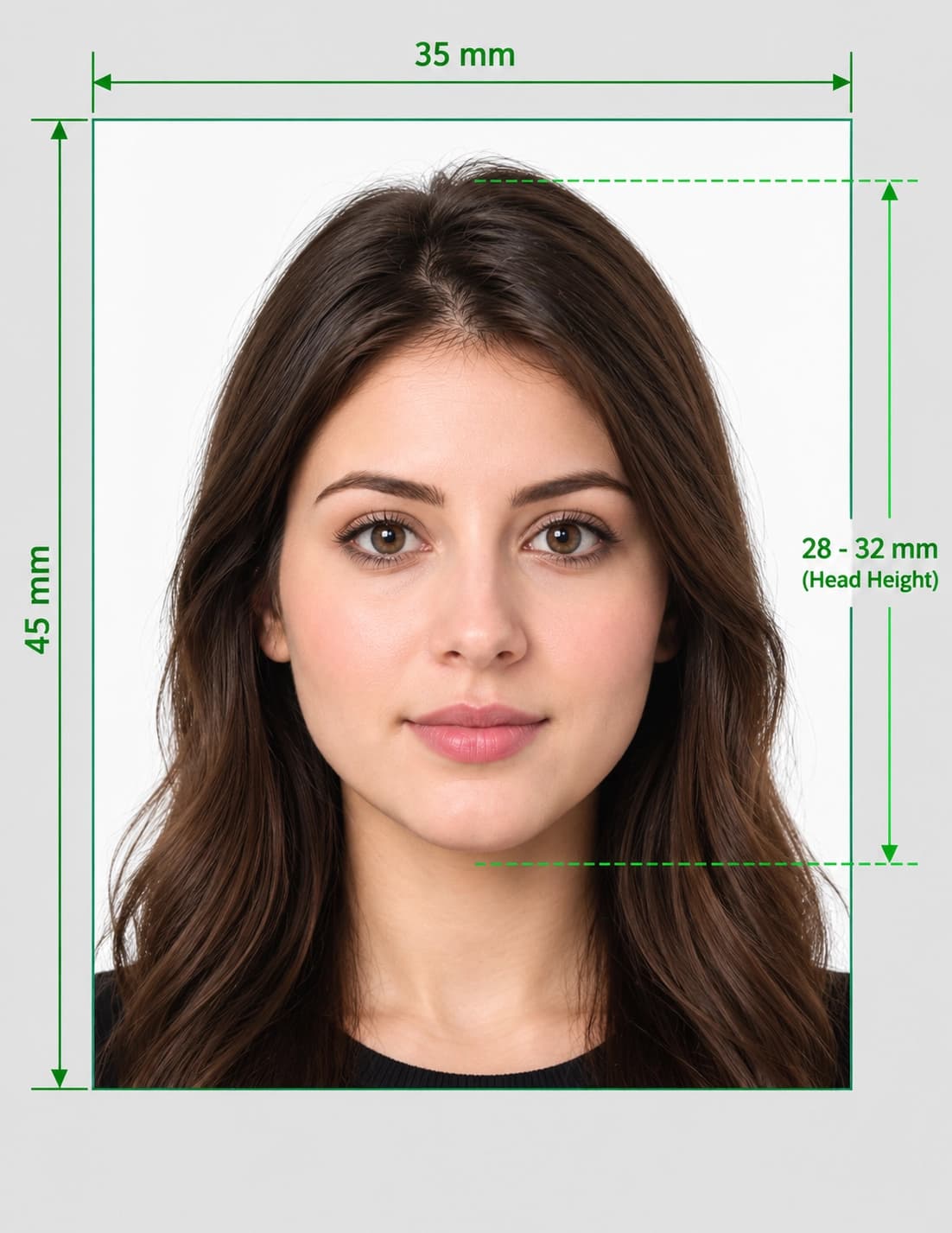
ICAO photo standards are the international rules for the face photo in a biometric passport or travel document. They are published by the International Civil Aviation Organization in Doc 9303 and are based on the ISO/IEC 19794-5 face image standard. They cover how your face is positioned, lit and framed so that machines and border officers can match you to your photo.
Quick answer: an ICAO compliant photo shows your whole face looking straight at the camera, with a neutral expression, eyes open, even lighting, no shadows or glare, a plain light background, and enough resolution for at least 90 pixels between the centres of your eyes. The exact photo size in mm or pixels is set by the country that issues your document, not by ICAO.
Want to skip the reading? Check your photo against ICAO-style rules now before you apply.
What Are ICAO Photo Standards?
ICAO in Plain English
ICAO (the International Civil Aviation Organization) is a United Nations agency. Its Doc 9303 sets the global specifications for machine readable travel documents, including passports. Part of that document explains what a passport face image must look like, so a photo taken in one country can be read by systems in another.
ICAO Photo Standard vs ISO/IEC 19794-5
Doc 9303 refers to ISO/IEC 19794-5, the technical standard for face image data. ISO defines the measurable face image properties, and ICAO adopts them for passports. When people search for the "ICAO biometric photo standard", they usually mean these two documents working together.
ICAO vs Country Passport Photo Size
ICAO does not set one universal print size. Each issuing country decides the photo size, background colour and file rules, while keeping within the ICAO face image principles. That is why a UK, US and Australian photo can all be ICAO based yet be different sizes.
Why this matters if your photo is rejected
A photo can follow ICAO face rules but still be rejected because it is the wrong size, colour or file type for your country. Always check both.
ICAO sometimes typed as "ICO"
Some people search for an "ICO compliant photo". It is the same thing: they mean ICAO.
ICAO Photo Requirements at a Glance
| Requirement | ICAO standard |
|---|---|
| Face position | Full face, centred, looking straight at the camera |
| Head pose | Head upright and not tilted, turned or lowered |
| Expression | Neutral, mouth closed, eyes open and clearly visible |
| Eye resolution | At least 90 pixels between the centres of the eyes |
| Lighting | Even across the face, no shadows, no red-eye, no glare |
| Background | Plain, uniform and light, with no pattern or objects |
| Image quality | Sharp and in focus, natural skin tone, colour, not retouched |
| Glasses | No glare, no tinted lenses, frames must not cover the eyes |
| Size and file type | Set by the issuing country |
ICAO Passport Photo Size: mm, Pixels and Resolution
ICAO Photo Size
ICAO does not give a single mm size. Common examples set by countries include:
| Country or use | Photo size |
|---|---|
| UK printed passport photo | 35 × 45 mm |
| US visa and passport photo | 2 × 2 inches (51 × 51 mm), square |
| Australian passport photo | 35–40 × 45–50 mm |
| Finland digital photo | 500 × 653 px |
Because these differ, use the size published by the authority you are applying to. See our guides for UK passport photo size, US visa photo size and Australian passport photo size.
ICAO Biometric Photo Size in Pixels
The key ICAO resolution rule is a minimum of 90 pixels between the centres of the eyes. A passport-size photo scanned at 300 dpi gives about this much detail, so low-resolution phone crops and heavily enlarged photos are a common reason for failing.
ICAO Photo Format and File Size
Format and file size depend on the country and the application system. JPEG is the most common format. Chip images are stored compressed and are small, so avoid over-compressing the face, which loses the detail biometric systems need.
ICAO Photo Specifications in Detail
Face and Head Position
Centred and straight
Your face must be in the centre of the frame, looking directly at the camera with your head upright.
Full head visible
The whole head must be visible, from the top of the hair to the bottom of the chin, with the shoulders and a little space around the head.
Expression and Eyes
Neutral expression
Keep a neutral expression with your mouth closed. Smiling changes the shape of your face and can reduce biometric match accuracy.
Eyes open and visible
Both eyes must be open and clearly visible, with no hair, frames or reflections covering them. Avoid red-eye.
Lighting and Shadows
Light must be even across the face. There should be no shadows on the face or on the background behind you, and no flash reflections on skin or glasses.
Background
Use a plain, uniform, light background with no patterns, objects or other people. Many countries name a specific colour, such as light grey, cream or white.
Glasses, Head Coverings and Accessories
Glasses
Many countries now ask you to remove glasses. If they are allowed, there must be no glare and the frames must not cover your eyes.
Head coverings
Allowed only for religious or medical reasons in most countries, and your full face from chin to forehead must remain visible.
Jewellery and piercings
These must not cover the face or cause reflections.
Image Quality
The photo must be sharp, correctly exposed, in natural colour and free of filters or retouching. Beauty modes and heavy smoothing can cause a rejection.
ICAO Compliant Photo Online: Free Check
What an Online ICAO Check Does
An online ICAO photo check reviews the things a tool can measure: background, head position, framing, lighting and basic quality. Use our passport photo checker to find problems before you pay for prints or upload a file.
ICAO Photo Converter and Photo Maker
If your photo is almost right, a photo maker can crop and resize it to a country's size. Try our passport size photo maker to crop to the correct dimensions, then lay out prints with the passport photo print template generator.
What an Online Tool Cannot Do
No online tool can certify that your photo is ICAO compliant or promise it will be accepted. The final decision is made by the passport office or embassy that receives it.
Why a Photo Is Rejected: "Photo Does Not Comply With ICAO Standards"
| Problem ❌ | Fix ✅ |
|---|---|
| Head tilted or turned | Face the camera with your head level and upright |
| Smiling or mouth open | Use a neutral expression with your mouth closed |
| Shadows on the face or background | Stand away from the wall and light your face evenly from the front |
| Patterned or dark background | Use a plain, uniform light background |
| Glare or tinted glasses | Remove glasses if allowed by your country, or avoid reflections |
| Eyes not clearly visible | Pin hair back and open both eyes fully |
| Photo too small or low resolution | Take a higher resolution image with at least 90 px between the eyes |
| Blurred or over-compressed | Use a sharp photo and avoid heavy compression |
| Filters or retouching | Use an unedited photo |
| Wrong country size | Use the size set by the country you are applying to |
How to Take an ICAO Compliant Photo at Home
- Ask someone to take it. Selfies distort the face and rarely give straight, even results.
- Use a plain, light background, and stand about half a metre in front of it to avoid shadows.
- Put the camera at eye level about 1.5 metres away and zoom in slightly rather than standing close.
- Light your face evenly from the front, with the light behind the camera.
- Look straight at the camera with a neutral expression, mouth closed and both eyes open.
- Check the photo, then crop and resize it to your country's required size.
Step-by-step guides: how to take a passport photo at home and how to take a passport photo on iPhone.
Where to Get an ICAO Photo Near Me
Most professional photo studios and labs know the ICAO face rules. Ask for a passport photo for your specific country, not a generic one, and confirm the size before you pay. Standard photo booths follow the booth country's size, which may not match the country you are applying to.
Check Your Photo Before You Apply
Upload your photo to our passport photo checker to review the background, head position and framing against ICAO-style rules before you apply. If you need prints, use the passport photo print template generator.
- Need a specific country's size? Try the passport size photo maker.
- Applying for a UK passport? See our UK passport photo size and requirements guide.
Frequently Asked Questions
Everything you need to know about official ICAO Photo Standards: Requirements and Free Online Photo Check requirements and specifications.
What are ICAO photo standards?
ICAO photo standards are the international rules in ICAO Doc 9303 for the face photo in a biometric passport. They cover head position, expression, lighting, background and image resolution, so machines and border officers can match you to your photo.
What is an ICAO compliant photo?
An ICAO compliant photo shows your whole face looking straight at the camera, with a neutral expression, eyes open, even lighting, no shadows or glare, a plain light background, and at least 90 pixels between your eye centres.
What is the ICAO passport photo size?
ICAO does not set one photo size. Each country sets its own, for example 35 × 45 mm in the UK and 2 × 2 inches in the US.
What is the ICAO photo size in pixels?
There is no single pixel size. The key ICAO resolution rule is at least 90 pixels between the centres of the eyes. Your country may also set a pixel size for digital uploads.
What is the ICAO photo format?
ICAO bases its face image rules on ISO/IEC 19794-5. The file format depends on the country and the application system, with JPEG being the most common.
Is ICAO the same as ISO/IEC 19794-5?
They are related but not the same. ISO/IEC 19794-5 defines face image data, and ICAO Doc 9303 refers to it for passport photos.
What is the ICAO biometric photo standard?
It is the set of face image rules in ICAO Doc 9303, based on ISO/IEC 19794-5, that make a photo suitable for automated face recognition in passports and border control.
Can I smile in an ICAO photo?
No. ICAO requires a neutral expression with your mouth closed, because smiling changes your facial features and can reduce biometric match accuracy.
Can I wear glasses in an ICAO photo?
It depends on your country. Many now ask you to remove glasses. If they are allowed, there must be no glare or tint, and the frames must not cover your eyes.
What background does an ICAO photo need?
A plain, uniform, light background with no patterns, objects or shadows. The exact colour is set by your country, for example cream or light grey in the UK.
What does "photo does not comply with ICAO standards" mean?
It means your photo failed a face or image-quality rule, such as head tilt, shadows, a smile, glare, a patterned background or low resolution. Fix the specific problem and re-check the photo, and also confirm that the size matches your country's rules.
Can I get an ICAO compliant photo online for free?
You can check and prepare a photo online for free with a photo checker or photo maker. You still need a photo that meets your country's size and format rules, and a tool cannot guarantee that it will be accepted.
What is an ICAO photo converter?
It is an online tool that crops, resizes or reformats a photo to meet a country's size and file rules. It cannot fix problems such as shadows, a tilted head or low resolution.
Where can I get an ICAO photo near me?
Use a professional photo studio or lab and ask for a passport photo for the country you are applying to. Confirm the size before you pay, because booths follow local sizes.
Is "ICO compliant photo" the same as an ICAO photo?
Yes. "ICO" is a common misspelling. People searching for an ICO compliant photo mean ICAO compliant.
Will my photo definitely be accepted if it follows ICAO standards?
No tool or standard can promise that. The passport office, embassy or visa authority makes the final decision, but checking your photo with our passport photo checker first helps you avoid common mistakes.
PixPassport is an independent service and is not affiliated with ICAO, ISO or any government passport authority. Information based on ICAO Doc 9303 and ISO/IEC 19794-5 in October 2026. Always follow the photo rules of the authority you are applying to.
Ready to create your ICAO Photo Standards: Requirements and Free Online Photo Check?
Prepare your photo using UK passport photo requirements and review it before submitting your application.
Upload Photo & Create Now