
Get Your Railcard Photo Right First Time
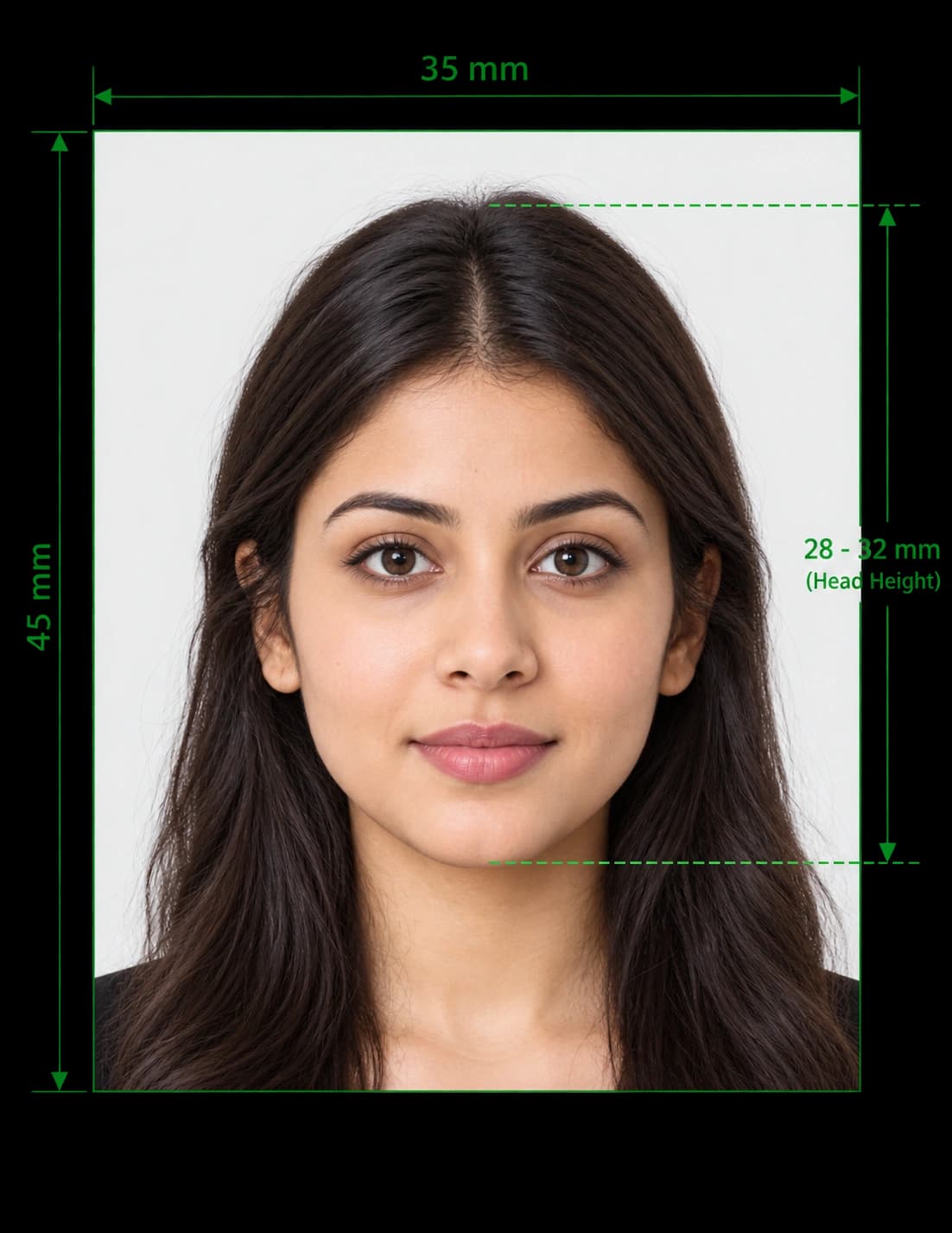
A digital Railcard needs a passport-style photo, and the upload step turns away blurry, badly lit or oddly cropped pictures. Our tool solves that. It crops your picture to 35×45 mm, lightens the background and checks your face size, so your photo railcard application goes through without a retake.
Upload a picture from your phone, review the checks and download a JPEG. The whole process takes about two minutes, and you can retake the picture as often as you like.
Many people search for this as a photo rail card. The official name is Railcard, written as one word, and the rules below cover both spellings.
Which Railcards Need a Photo?
Most Railcards that you buy online need a photo. This table shows what each one asks for:
| Railcard | Photo needed? |
|---|---|
| 16-25 Railcard | Yes. You upload a digital passport-style photo. A station sale also gives you a separate photocard. |
| 26-30 Railcard | Yes. This Railcard exists in digital form only, so you always upload a photo. |
| Two Together Railcard | Yes. Every customer provides a photograph, including the second named holder. |
| Network Railcard | Yes for the digital version. No for a plastic card that you order online. |
| Senior Railcard | Yes for the digital version. A plastic card bought online usually carries no photo. |
| Family & Friends, Disabled Persons and Veterans Railcards | Rules differ, so read the application screen before you start. |
In short, every digital Railcard works as a photo railcard, because the card itself shows your face. Rail staff compare that face with you when they check your ticket. If staff cannot confirm that the person on the Railcard is you, the train company can charge the full Standard Single fare and, in some cases, a Penalty Fare.
Railcard Photo Requirements in the UK
The Railcard rules are simpler than the GOV.UK passport rules, but the issuer still rejects pictures that fail these checks.
Pose and Framing
- Show a good likeness. The picture must look like you today, not like you five years ago.
- Fill the frame. Show your head and shoulders in close-up. Your face should fill roughly 70% of the picture.
- Face the camera. Look straight at the lens with a relaxed, neutral expression.
Quality and Background
- Keep it sharp. The issuer rejects blurred pictures.
- Use even light. Avoid harsh shadows on your face and on the wall behind you.
- Choose a plain, light background. Patterns, other people and clutter cause rejections.
- Use colour. Railcard websites prefer colour, but they accept black and white.
Face, Glasses and Headwear
- Keep your face clear. Nothing may cover the outline of your eyes, nose or mouth.
- Move hair and hats away. Hair and hats must not hide your face.
- Remove dark glasses. If you wear normal glasses, make sure the lenses show no reflections and your eyes stay visible.
- Wear religious headwear if you need to. Show your full face from chin to forehead. Railcard websites follow the DVLA and Passport Office rule, so full face veils do not pass.
File Rules
| Item | What to use |
|---|---|
| File type | JPEG or PNG. Some Railcard websites list other types, so JPEG is the safest choice. |
| File size | 5MB or less |
| Resolution | At least 300 DPI |
| Dimensions | 413 × 531 px (35×45 mm at 300 DPI) |
| Orientation | Portrait, never landscape |
Each Railcard website words its upload rules slightly differently, so always read the instructions on the screen where you upload.
Passport Photo Railcard Size: 35×45 mm
Railcard websites ask for a passport-style photo. In the UK, that means 35×45 mm, the same size as a UK passport photo. Treat your passport photo railcard file the same way: portrait frame, head and shoulders, plain light background.
| Unit | Railcard photo size |
|---|---|
| Millimetres | 35 × 45 mm |
| Centimetres | 3.5 × 4.5 cm |
| Inches | About 1.38 × 1.77 in |
| Pixels at 300 DPI | About 413 × 531 px |
| Aspect ratio | 7:9 |
Railcard websites do not set a strict background colour, so pick a plain light one such as light grey. If you already have a recent UK passport photo, you can use it, as long as it still looks like you.
How to Get a Railcard With Your Photo in 5 Steps
- Choose your Railcard. Pick the type you qualify for, then select the digital version if the site offers a choice.
- Prove your age. For the 16-25 and 26-30 Railcards, enter a valid passport, UK driving licence or EEA national identity card number.
- Upload your photo. Add your 35×45 mm picture when the site asks for it.
- Pay for your Railcard. Check your details, then complete the payment.
- Download your Railcard. In most cases the digital Railcard works straight away. The site emails you a download code with instructions. A plastic Railcard can take up to 10 days to arrive.
You can also buy a Railcard for someone else, as long as they meet the age rules and you have their ID details and photo.
Buying a Railcard at a Station
You can buy a plastic Railcard at a staffed station. When the Railcard type needs a photo, the ticket office issues a separate photocard, so bring a printed passport-style photo with you.
To print your photo at home:
- Download the print sheet and choose the 6 × 4 inch (10 × 15 cm) layout.
- Load glossy or matt photo paper.
- Print at 100% scale and turn off "fit to page".
- Measure one photo with a ruler to confirm 35 × 45 mm, then cut along the guides.
Common Railcard Photo Mistakes
| Mistake ❌ | Fix ✅ |
|---|---|
| Taking a selfie with a messy background | Stand against a plain wall and use even light |
| Uploading a huge phone file | Crop the picture and keep the file under 5MB |
| Wearing a hat or dark glasses | Remove them so your face is fully visible |
| Using an old picture | Take a fresh picture that looks like you now |
| Stretching the image to fit | Crop the picture, and never stretch it |
| Uploading a HEIC file from an iPhone | Save or convert it as a JPEG |
| Using a landscape picture | Switch to portrait, 35×45 mm |
How to Change Your Railcard Photo
Your photo must still look like you. If your appearance changes significantly, update it. The steps depend on how you bought your Railcard:
| Situation | What to do |
|---|---|
| Your 16-25 Railcard photo no longer looks like you | Call the Railcard helpline and pay the £10 administration fee. The adviser explains how to send your new photo. |
| Your Two Together Railcard came from the website | Wait for renewal and update the photo then. If you cannot wait, call the helpline, pay £10 and email a new passport-style photo. |
| You bought your Railcard at a station | Take the Railcard and a new passport-style photo to a staffed station, and pay £10. |
| You are renewing your digital Railcard | Check the renewal screens. Some Railcards let you update the photo at this stage, and renewal opens up to 30 days before expiry. |
| You are replacing a lost or stolen photocard | Request the replacement and pay £10. You also need to provide a new photo. |
What You Get With Our Railcard Photo Tool
- Exact cropping: The editor sets the 35×45 mm frame around your face.
- Background clean-up: It replaces your wall or room with a plain light background.
- Face-size check: It measures how much of the frame your face fills.
- Passport photo railcard files: It exports a JPEG under 5MB at 413 × 531 px.
- Phone-friendly design: Upload straight from your camera roll, without a studio visit.
- Print sheet: Download several copies on a 6 × 4 inch sheet for station photocards.
- Photo rail card ready: Use one file for every Railcard type that asks for a photo.
Make Your Photo Railcard Image Now
Upload your picture and download a correctly sized 35×45 mm Railcard photo in minutes. You need no studio visit and no editing skills.
Frequently Asked Questions
Everything you need to know about official Railcard Photo Maker for the UK requirements and specifications.
How do I get a photo railcard?
Choose your Railcard online, enter your passport, driving licence or EEA ID number to prove your age, and upload a passport-style photo. Pay, then download your digital Railcard from the email link. Most digital Railcards work straight away.
Can't upload photo railcard? How do I fix it?
Work through these fixes in order:
- Retry the upload. A short connection problem often causes the failure.
- Check the file size. Crop the picture or lower the quality until it falls under 5MB, but keep it sharp enough to print on a card.
- Use JPEG or PNG. Convert HEIC and other formats first.
- Switch browser. Older browser versions cause many upload errors. Try an up-to-date Chrome, Safari, Firefox or Edge.
- Try another device. Upload from your phone if your laptop fails, or the reverse.
- Change the picture. If the site accepts the file but then rejects the photo, it usually judges the image unsuitable. Retake it against a plain wall in even light.
If nothing works, contact the helpline for your Railcard.
How do I change my photo railcard?
If you bought online, you can often update the photo when you renew. If you cannot wait, call the helpline for your Railcard, pay the £10 administration fee and send a new passport-style photo as the adviser directs. If you bought at a station, take your Railcard and a new photo to a staffed station.
What size is a Railcard photo?
Use 35×45 mm, which equals 413 × 531 pixels at 300 DPI. Keep the file at 5MB or less.
Do I need a photo for a Railcard?
You need one for every digital Railcard and for the 16-25 and Two Together Railcards. A plastic Network Railcard that you order online does not need a photo.
Can I use my passport photo for a Railcard?
Yes. A passport photo railcard upload works as long as the picture is recent, sharp and still looks like you. If you only have a printed passport photo, scan or photograph it flat, then crop the result.
Can I use a selfie for my Railcard?
You can, but most selfies fail. Poor lighting, a distracting background and a wide-angle distortion all lead to rejection. Use a tripod or a friend, or let our tool clean up the picture.
Do I need a white background?
Railcard websites do not demand white. Choose a plain, light background such as light grey, and avoid patterns and shadows.
Can I wear glasses, a hat or religious headwear?
Remove hats and dark glasses. Keep normal glasses only if your eyes stay clear and the lenses show no reflections. You can wear religious headwear, but your full face must show from chin to forehead.
Can I use a black and white photo?
Yes, Railcard websites accept black and white. They prefer colour, though, so use colour where you can.
Does my Railcard photo need to be recent?
Yes. The picture must look like you now. Take a new one if you have changed your hair, grown a beard or aged noticeably since the old picture.
Is a photo rail card the same as a Railcard?
Yes. People write it both ways. The official name is Railcard, and the photo rules apply to every type that asks for one.
Do I need a new photo to renew my Railcard?
It depends on the Railcard and the site. Some sites let you keep your existing photo, and others let you replace it during renewal. Read the renewal screens to see what yours asks for.
How long does it take to get a digital Railcard?
In most cases it works straight away. You receive a download code by email, then follow the instructions to add it to your phone.
Can I buy a Railcard for someone else?
Yes, if they meet the age rules. You need their passport, driving licence or EEA ID details and a passport-style photo of them.
I changed my phone. Why has my Railcard disappeared?
Digital Railcards live on your device, so they do not move to a new phone by themselves. Log in to your Railcard account and request a new download code.
What happens if staff think the photo is not me?
Staff can refuse the discount. If they cannot confirm that the person on the Railcard is you, the train company can charge the full Standard Single fare and, in some cases, a Penalty Fare. Keep your photo up to date to avoid this.
Can I use the tool for free?
You can upload your picture and preview the result before you pay. The final file is a paid download, so check the current price in the editor.
Will my photo definitely be accepted?
No tool can promise that. The Railcard issuer makes the final decision, but our checks help you avoid the most common mistakes.
Ready to create your Railcard Photo Maker for the UK?
Prepare your photo using UK passport photo requirements and review it before submitting your application.
Upload Photo & Create Now