
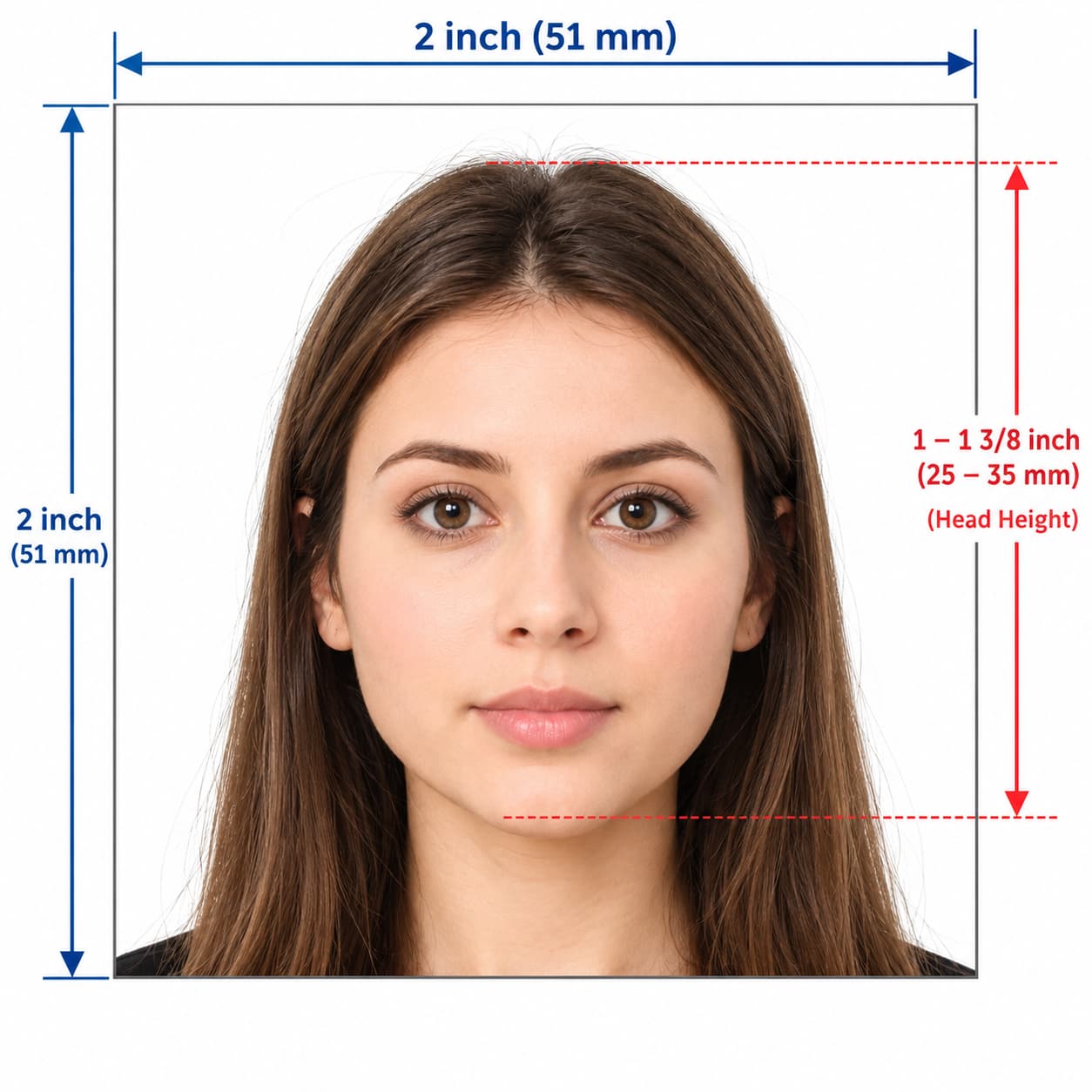
A US visa photo must be square: 2 × 2 inches (51 × 51 mm) for a print, or between 600 × 600 and 1200 × 1200 pixels for a digital upload such as the DS-160 form. It needs a plain white or off-white background, a neutral expression, no glasses, and must be taken in the last 6 months.
This is different from a standard UK passport photo (35 × 45 mm), so a UK photo booth strip is the wrong size for a US visa.
Want to skip the reading? Check your US visa photo now before you upload it.
US Visa Photo Requirements at a Glance
| Requirement | US visa photo |
|---|---|
| Print size | 2 × 2 inches (51 × 51 mm), square |
| Digital size | 600 × 600 px minimum, 1200 × 1200 px maximum, square |
| File format | JPEG, in colour (sRGB) |
| File size | 240 KB or less |
| Head height (paper photo) | 1 to 1⅜ inches (25–35 mm), top of hair to bottom of chin |
| Head height (digital photo) | 50–69% of the image height |
| Eye height | 1⅛ to 1⅜ inches (28–35 mm) from the bottom of a paper photo, or 56–69% of a digital image's height |
| Background | Plain white or off-white, no shadows |
| Age of photo | Taken within the last 6 months |
| Expression | Neutral or a natural smile, facing the camera, both eyes open |
| Glasses | Not allowed |
US Visa Photo Size: Inches, mm and Pixels
US Visa Picture Size in Inches and Millimetres
| Measurement | Inches | Millimetres | Centimetres |
|---|---|---|---|
| Width × height | 2 × 2 in | 51 × 51 mm | 5.1 × 5.1 cm |
| Head height | 1–1⅜ in | 25–35 mm | 2.5–3.5 cm |
| Eye height from bottom | 1⅛–1⅜ in | 28–35 mm | 2.8–3.5 cm |
US Visa Photo Size in Pixels (DS-160 Upload)
For an online application, the image must be square, at least 600 × 600 px and no more than 1200 × 1200 px. It must be a colour JPEG, 240 KB or smaller. If your file is too big, compress it, keeping the compression ratio at 20:1 or lower.
Scanning an Existing Photo
If you scan a printed photo, scan it at 300 pixels per inch. A 2-inch photo scanned at 300 ppi gives exactly 600 × 600 px.
US Visa Photo Size vs UK Passport Photo Size
| US visa photo | UK printed passport photo | |
|---|---|---|
| Shape | Square, 2 × 2 in (51 × 51 mm) | Portrait, 35 × 45 mm |
| Head size | 25–35 mm | 29–34 mm |
| Background | White or off-white | Cream or light grey |
| Digital file | 600–1200 px square, JPEG, 240 KB max | Not applicable for a paper application |
US Visa Photo Guidelines
What Your US Visa Photo Must Show
- your full head, from the top of your hair to the bottom of your chin
- your head centred in the frame and facing the camera
- a neutral expression or a natural smile, with both eyes open
- even lighting, natural skin tone and a sharp, in-focus image
- clothing you would wear every day
What Your US Visa Photo Must Not Have
- glasses (no longer allowed in visa photos)
- shadows on your face or on the background
- filters, retouching or digital changes
- uniforms or camouflage clothing
- headphones or wireless devices
- another person or object in the picture
Acceptable Photos: Head Coverings and Medical Exceptions
Religious head coverings
You can wear a head covering if you wear it every day for religious reasons. Your full face must be visible, and the covering must not cast shadows.
Medical head coverings
A head covering for medical reasons is also allowed, with a signed statement from you. Your full face must still be visible.
Hair and jewellery
Hair must not cover your eyes or the edges of your face. Keep jewellery and piercings from covering or reflecting light across your face.
Babies and Children
Children need the same size photo. Parents should not be visible in the picture, so lay a baby on a plain white sheet and photograph from above. Our UK baby passport photo guide has tips that also work for this.
Which Photo Do I Need? DS-160, Interview Print or Green Card
DS-160 Photo Requirements (Nonimmigrant Visa Online Form)
The DS-160 asks you to upload a digital photo that meets the digital rules above. If the upload fails, or if your embassy or consulate asks for one, you may need to bring a printed 2 × 2 inch photo to your interview.
Do I Need a Printed US Visa Photo for the Interview?
Some US embassies and consulates ask you to bring one printed photo to the interview that meets all the requirements. Check the instructions on your appointment confirmation and the US Embassy website for the location where you are applying.
Green Card Photo Requirements
Green card and other USCIS photo requirements are published by USCIS and can differ in details such as how recent the photo must be. Check the instructions for your specific form before you submit, and do not assume a visa photo will be accepted.
DV Lottery Photo Requirements
The Diversity Visa (DV) lottery asks for a digital photo that is exactly 600 × 600 px, in JPEG format, within the file-size limit. Check the current instructions on the official DV entry page before you upload.
Where to Get a US Visa Photo in the UK
You have three realistic options.
| Option | What to do | Good to know |
|---|---|---|
| Professional photo studio | Ask for a US visa photo, 2 × 2 in, and a digital copy | The State Department recommends a professional service, and it is the safest route |
| Take the photo yourself, then check it | Take a well-lit photo against a plain wall, crop to a square, then check it | Free to do, but easy to get the head size or shadows wrong |
| Standard UK photo booth | Not recommended | Booths usually print 35 × 45 mm, not a 2 × 2 inch square |
US Visa Photo Near Me
Search for a photo studio or photo lab near you and ask specifically for a US visa photo (2 × 2 inch) with a digital copy. Confirm the size before you pay, because many UK shops default to UK passport size.
Free US Visa Photo Tool and Photo Cropping
The US Department of State offers a free photo tool that crops an image you already have to exactly 600 × 600 px. It is for cropping only, and an official makes the final decision on whether your photo is acceptable. Use our photo checker to review the background, head position and framing first, then crop.
US Visa Photo App and Online Services
An app or online tool can help you take, check and crop a photo, but it cannot guarantee acceptance. Acceptance is always decided by the US embassy or consulate you apply to.
Common US Visa Photo Mistakes
| Problem ❌ | Fix ✅ |
|---|---|
| Using a 35 × 45 mm UK photo | Use a square 2 × 2 inch print or a 600–1200 px square digital file |
| Image not square | Crop to equal width and height |
| Head too large or too small | Keep head height at 50–69% of the image, or 25–35 mm on a print |
| Glasses on | Take them off |
| Shadows on the face or background | Stand about half a metre from a plain wall and light your face evenly from the front |
| Grey, cream or patterned background | Use a plain white or off-white wall |
| File over 240 KB | Compress the JPEG, keeping the ratio at 20:1 or lower |
| Photo older than 6 months | Use a photo taken in the last 6 months |
| Filter, retouching or beauty mode | Use an unedited photo |
| Smiling widely or eyes closed | Use a neutral expression or a natural smile with both eyes open |
How to Take a US Visa Photo at Home
- Ask someone to take it. Selfies distort your face and rarely fit the head-size rule.
- Stand in front of a plain white or off-white wall, about half a metre away to avoid shadows.
- Put the camera about 1.5 metres away and zoom in slightly, at eye level.
- Light your face from the front, with the light behind the camera.
- Look straight ahead with a neutral expression or a natural smile, both eyes open, no glasses.
- Crop to a square, with your head filling 50–69% of the height and your eyes between 56% and 69% from the bottom.
- Export as a JPEG at 600 × 600 px or larger, 240 KB or smaller.
Step-by-step guides: how to take a passport photo at home and how to take a passport photo on iPhone.
Check Your US Visa Photo Before You Apply
Upload your photo to our passport photo checker to check your background, head position and framing before you upload it to the DS-160 or print it. If you need a print, use the passport photo print template generator to lay out a sheet for your photo lab.
- Need another country's size? Try the passport size photo maker or our Australian passport photo guide.
- Applying for a UK passport instead? See our UK passport photo size and requirements guide.
Other Visa Photo Sizes: Chinese, Turkish and More
Every country sets its own visa photo size, file type and background colour. For example, Chinese and Turkish visa photos do not follow the US 2 × 2 inch rule. Always use the photo instructions published for the specific country and visa you are applying for, and do not reuse a US photo.
Frequently Asked Questions
Everything you need to know about official US Visa Photo: Size, Requirements and Online Photo Check requirements and specifications.
What size is a US visa photo?
A US visa photo is 2 × 2 inches (51 × 51 mm) for a print, and between 600 × 600 and 1200 × 1200 pixels for a digital upload. It must be square.
What are the US visa photo requirements?
The photo must be square, in colour, taken within the last 6 months, on a plain white or off-white background, with your full head visible, a neutral expression or natural smile, both eyes open, and no glasses. Head height must be 1 to 1⅜ inches (25–35 mm) on a print.
What is the US visa photo size in pixels?
Between 600 × 600 and 1200 × 1200 pixels, with equal width and height. The file must be a colour JPEG of 240 KB or less.
What is the US visa photo size in mm and cm?
51 × 51 mm, or 5.1 × 5.1 cm, which is the same as 2 × 2 inches.
What is the US visa photo file size limit?
240 KB (kilobytes) or smaller, in JPEG format. If your file is larger, compress it, keeping the compression ratio at 20:1 or lower.
Can I wear glasses in a US visa photo?
No. Glasses are no longer allowed in US visa photos, so remove them before the photo is taken.
What background colour does a US visa photo need?
A plain white or off-white background with no shadows or patterns.
How recent must a US visa photo be?
It must have been taken within the last 6 months and look like you now.
Can I take my own US visa photo?
Yes. The State Department recommends a professional service but allows you to take the photo yourself, as long as it meets every requirement. The embassy or consulate makes the final decision on acceptance.
What is the DS-160 photo requirement?
For the DS-160 you upload a square colour JPEG, between 600 × 600 and 1200 × 1200 px, 240 KB or less, that meets the composition rules above. Some embassies also ask for a printed 2 × 2 inch photo at the interview.
Do I need a printed US visa photo for my interview?
Some embassies and consulates do. Check your appointment instructions and the website of the US embassy or consulate where you apply.
Is there a free US visa photo tool?
Yes. The US Department of State has a free photo tool that crops an existing image to 600 × 600 px. It only crops, so check the background, head size and lighting yourself or with our photo checker.
Can I use a UK passport photo for a US visa?
No. A UK passport photo is 35 × 45 mm and portrait-shaped, while a US visa photo must be square (2 × 2 inches or 600–1200 px). The head size rule is also different.
Where can I get a US visa photo near me in the UK?
Use a professional photo studio or lab and ask specifically for a US visa photo, 2 × 2 inches, with a digital copy. Confirm the size before you pay, because many UK shops default to UK passport size.
Are green card and DV lottery photos the same as a US visa photo?
They are similar in size and composition, but the rules for how recent the photo must be and the file requirements can differ. Follow the instructions for your specific form: USCIS for green card applications, and the official DV entry page for the lottery.
Will my US visa photo definitely be accepted?
No tool can promise that. The US embassy or consulate makes the final decision, but checking your photo with our passport photo checker first helps you avoid the most common mistakes.
PixPassport is an independent service and is not affiliated with the US Department of State, USCIS or any US embassy or consulate. Rules checked against the US Department of State visa photo requirements, digital image requirements and photo composition template in October 2026.
Ready to create your US Visa Photo: Size, Requirements and Online Photo Check?
Prepare your photo using UK passport photo requirements and review it before submitting your application.
Upload Photo & Create Now