
Make a British Passport Picture Online in Minutes
You do not need a photo booth to get a correct British passport picture. Upload a photo from your phone, and our British passport picture maker crops it to the 35 × 45 mm UK size, replaces the background with a plain light shade, and checks your head size against the official range.
Use this tool for a first adult or child application, a renewal, or a replacement for a lost or damaged passport. It is also a quick way to prepare a new British passport picture when your old one no longer looks like you. Download a digital JPEG for the online application, or arrange copies on a sheet with our passport photo print template generator and print them at a local shop.
1. How to Use the British Passport Picture Maker
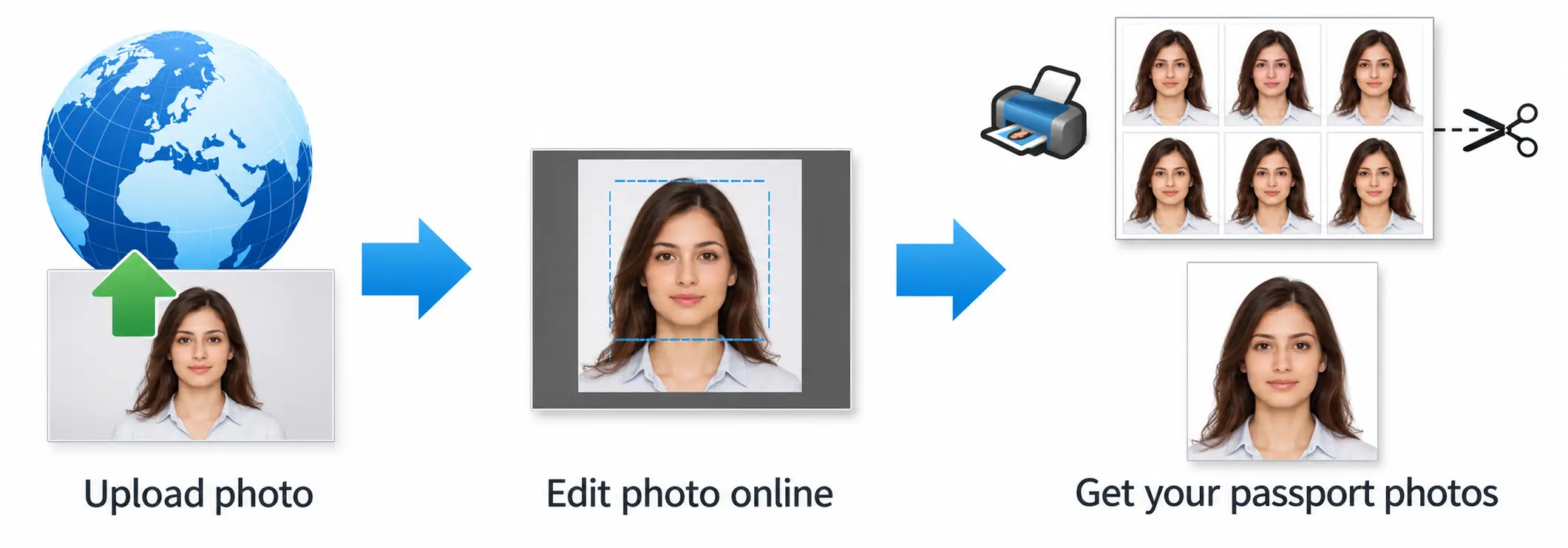
The whole process takes about two minutes, and you can retake your photo as often as you like. If you want a UK-only tool, see our UK passport photo maker for the standard 35×45 mm specification.
1.1 Step 1: Upload or Take Your Photo
Choose a clear, front-facing picture from your phone or computer, or take a new one in your browser. Use soft, even light and leave a little space around your head so the editor can crop correctly.
1.1.1 Accepted formats: JPG, PNG and HEIC
Upload JPG, PNG or HEIC files. HEIC is the default format on most iPhones, so you can use your camera roll photo without converting it first. For help with taking the shot, read our guide on how to take a passport photo on iPhone.
1.2 Step 2: Auto-Crop to 35 x 45 mm UK size
The editor centres your face and crops the image to the 35 × 45 mm passport photograph UK format. It also removes your background, replaces it with a plain light shade, and shows whether your head size fits the allowed range.
1.3 Step 3: Download Your Photo
Review the preview, then download your finished photo. If the result is not right, go back and retake it at no extra effort.
1.3.1 Digital file and printable sheet options
- Digital file: A high-quality JPEG ready to upload to the online passport application.
- Printable sheet: A 4×6″ template with several copies and cutting marks, made with our passport photo print template generator. Print at 100% scale on photo-quality paper.
2. What a British Passport Picture Needs
HM Passport Office sets clear rules for every British passport picture. Check them before you start, because a photo that breaks a rule can delay your application.
| Requirement | UK standard |
|---|---|
| Print size | 35 × 45 mm |
| Digital size | At least 600 px wide and 750 px high, portrait |
| File format | JPEG, in colour, between 50 KB and 10 MB |
| Head size | About 29–34 mm from chin to crown |
| Background | Plain cream or light grey, with no shadows or patterns |
| Photo age | Taken within the last month |
2.1 New Passport Photo Standards
Your photo must be a recent, clear and unaltered likeness. Do not use filters, and do not retouch the image. Take it in even light, with no glare, shadows or red-eye, and submit a colour photo that is sharp and in focus.
2.1.1 Neutral expression, mouth closed
Keep a neutral expression with your mouth closed. Smiling is not allowed in a UK passport style photo, because the system and border officers need a consistent face to match.
2.1.2 Clear view of both eyes
Look straight at the camera with your head level and both eyes open and visible. Keep hair, hands and objects away from your face, and make sure there is no glare from glasses frames or hair across your eyes.
2.2 Style and Appearance Rules
- Take off your glasses. Glasses are only allowed if you cannot remove them for medical reasons, and you may need to explain why.
- Wear everyday clothing. Avoid white or very light tops that blend into the background, and avoid uniforms.
- Cover your head only for religious or medical reasons. Your full face, from chin to forehead, must stay visible.
- Keep your face clear. Pull hair back from your eyes and face.
- Avoid headphones and accessories. Remove earbuds, headsets and large jewellery that could cast shadows.
| Do this ✅ | Avoid this ❌ |
|---|---|
| Use a plain cream or light grey background | Patterned walls, shadows or a white background |
| Look straight at the camera at eye level | Tilting your head up, down or sideways |
| Keep a neutral face with your mouth closed | Smiling, frowning or raised eyebrows |
| Use a recent photo taken in the last month | Submitting an old or heavily edited photo |
| Light your face evenly | Glare, harsh shadows or a dark, grainy image |
3. Why Use Our British Passport Picture Maker?
Our online tool handles each step, so you avoid the common mistakes that get a UK passport style photo rejected.
3.1 Look Your Best Within the Rules
- Automatic 35×45 mm crop: The editor sets the frame around your face.
- Background removal: It replaces your wall or room with a clean, compliant background.
- Head-size check: It measures your head against the UK range.
- Picture converter: Turn an existing photo into a British passport picture without a retake using our image to passport size converter.
- Phone-friendly editing: Use any smartphone and finish in your browser.
For more tips on lighting and setup, see our passport photo at home DIY guide.
3.2 Fast, Clean, Print-Ready Result
Skip the booth queue and the studio fee. You get a digital file for the online application and a printable sheet for a paper form, both from the same upload. UK style passport photos made this way are ready in about two minutes, and you can print them at home or at a shop such as Boots, Tesco or Snappy Snaps.
If you need other countries, our Passport Size Photo Studio covers 50+ formats, including the Schengen visa photo maker, the Indian passport and OCI photo maker and the UK driving licence photo tool. Applying to the United States instead? Use our US visa photo tool for the square 2×2 inch format.
Frequently Asked Questions
Everything you need to know about official British Passport Picture Maker Online requirements and specifications.
What photo is needed for a new British passport?
A new British passport picture must measure 35 × 45 mm, be taken within the last month, and show your face clearly against a plain cream or light grey background. For an online application, upload a colour JPEG of at least 600×750 px. Keep a neutral expression, look straight at the camera, and take off your glasses.
Can I smile in a British passport picture?
No. Use a neutral expression with your mouth closed and both eyes open. A natural, relaxed face helps the system match you to your passport photo British officials see at the border.
Does my passport picture need a specific background?
Yes. Use a plain cream or light grey background with no shadows, patterns or objects. Our tool replaces your background automatically, so you can take the photo in any room with even light.
Upload your photo now, and get a correctly sized British passport picture in minutes. No studio visit and no editing skills needed.
Ready to create your British Passport Picture Maker Online?
Prepare your photo using UK passport photo requirements and review it before submitting your application.
Upload Photo & Create Now