
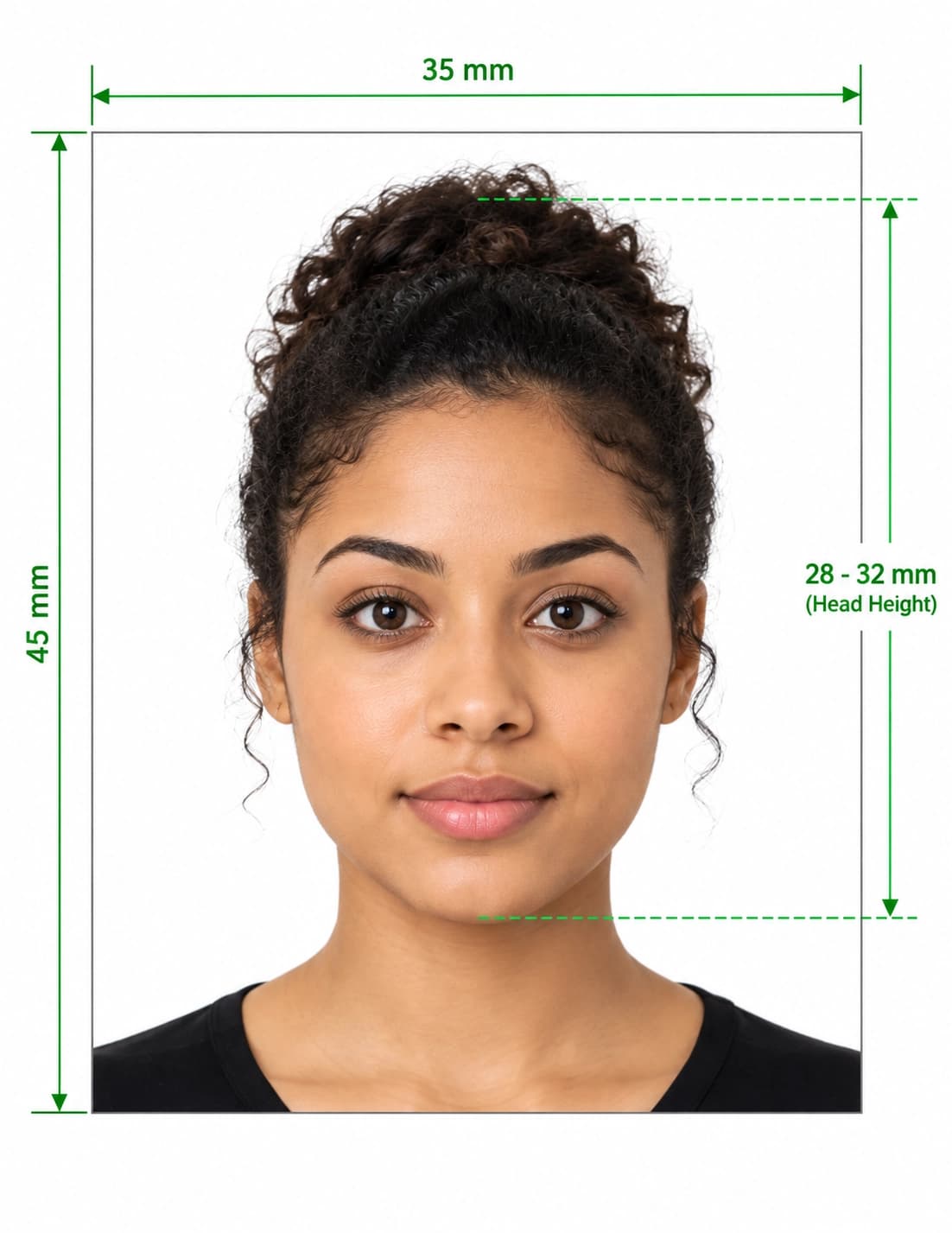
A passport photo that breaks the rules can delay your application or cause problems when you travel. This guide sets out the UK passport picture rules in plain English, based on the guidance HM Passport Office publishes on GOV.UK. You will find the passport photo standards UK applicants must meet, the full passport photo specifications UK for both digital and printed photos, and practical tips to get it right the first time.
The rules below were checked against GOV.UK guidance in October 2026. Requirements can change, so always confirm on GOV.UK before you apply.
1. UK Passport Photo Standards at a Glance
The UK has two sets of united kingdom passport photo requirements, depending on how you apply. Online applications use a digital photo. Paper applications use two printed photos. The rules that apply to both are:
- Your photo must have been taken in the last month.
- You need a new photo every time you get a new passport, even if you look the same.
- The photo must be clear, in focus and in colour, with no filters or editing.
- You must face forwards, look at the camera, keep a plain expression and have your mouth closed.
- Your background must be plain, light-coloured and in clear contrast to you.
1.1 Digital vs Printed Photo Specifications
This table summarises the UK passport photo size requirements and other technical passport photo specifications UK applicants need.
| Specification | Digital photo (online) | Printed photos (paper form) |
|---|---|---|
| Number needed | One digital photo or photo code | 2 identical photos |
| Size | At least 600 px wide × 750 px tall | 45 mm high × 35 mm wide |
| File size | At least 50KB, no more than 10MB | Not applicable |
| Head size | Include head, shoulders and upper body; the service crops it | Crown to chin between 29 mm and 34 mm high |
| Background | Plain, light-coloured, in clear contrast to you | Plain cream or light grey, in clear contrast to you |
| Paper | Not applicable | Plain white photographic paper, no border |
| Colour | In colour, no filters or effects | In colour, no filters or effects |
| Editing | Unaltered by computer software | Unaltered by computer software |
2. UK Passport Photo Size Requirements
Size is the most searched part of the rules, so here are the exact figures.
2.1 Printed Passport Photo Size (35 × 45 mm)
The standard passport photo size UK printed photos must meet is 45 mm high by 35 mm wide, which is also the size used in UK photo booths. In inches that is roughly 1.77 × 1.38. Your photos must not be a cut-down version of a larger picture. If you use a booth outside the UK, check it can produce this exact size.
The image of you, measured from the crown of your head to your chin, must be between 29 mm and 34 mm high. This is the measurement most home prints get wrong.
2.2 Digital Passport Photo Size in Pixels
The UK passport photo size in pixels for a digital photo is at least 600 pixels wide and 750 pixels tall, with a file size between 50KB and 10MB. These are minimums, so a higher-resolution original is fine. Upload the original file, not a screenshot or a copy shrunk by a messaging app.
If you take the photo on your own device, include your head, shoulders and upper body, and do not crop it. The application service crops it for you.
2.3 Printing at Home: What 35 × 45 mm Means in Pixels
If you are preparing prints, a 35 × 45 mm photo at 300 DPI works out at about 413 × 531 pixels (our calculation, not an official figure). GOV.UK says printed photos must be printed to a professional standard, so a shop or photo booth is usually the safer option than a home printer.
3. UK Passport Photo Background and Lighting Rules
The UK passport background rules differ slightly between formats.
- Digital photo: a plain, light-coloured background with no texture or pattern, and no objects behind you.
- Printed photo: a plain cream or light grey background.
- Both: the background must contrast clearly with you, and there must be no shadows on your face or behind you.
A common mistake is assuming bright white is best. A very white wall can look harsh and reflective, so light grey or cream is often easier to work with. Stand away from the wall and face a window or soft, even light to avoid shadows.
4. Face, Expression and Pose Rules
These rules on passport photos UK apply to printed and digital photos alike. You must:
- face forwards and look straight at the camera
- have a plain expression with your mouth closed
- have your eyes open and visible
- have no hair in front of your eyes
- have nothing covering your face
- have no shadows on your face
The photo must also contain no other people or objects, and must not have red-eye.
4.1 Passport Photo Hair Rules UK
The official passport photo hair rules UK are short: hair must not be in front of your eyes. That covers fringe rules too, so sweep or pin a fringe aside if it falls across your eyes. GOV.UK does not require you to tie your hair back otherwise, but your whole face must stay visible.
4.2 Glasses
GOV.UK says not to wear glasses unless you have to. If you must wear them, they cannot be sunglasses or tinted glasses, and your eyes must not be covered by the frames or by any glare, reflection or shadow. If glare is a problem, tilt your head slightly or remove the glasses if you can.
4.3 Head Coverings
You cannot wear a head covering in your photo unless it is for religious or medical reasons. Your face must remain fully visible.
5. Passport Photo Rules for Babies and Children
Children follow the same size and background rules, with some relaxations. GOV.UK says:
| Situation | Rule |
|---|---|
| Children must be alone | No other people in the picture |
| Babies | Must not hold toys or use dummies |
| Children under 6 | Do not have to look at the camera or have a plain expression |
| Children under 1 | Do not have to have their eyes open |
| Supporting a baby's head | You can use your hand, but it must not be visible in the photo |
| Babies under 1 (lying down) | Place on a plain light-coloured sheet and take the photo from above |
6. UK Digital Passport Photo Requirements: Photo Code or Own Device
The UK digital passport photo requirements also cover how you supply the photo. You have two options:
- Photo code from a booth or shop: get a digital photo before you apply and choose the option to receive a code. You enter the UK passport photo code during your application and the photo is added automatically.
- Your own device: take a photo during your application. You need someone to help you take it, which means a selfie does not meet the guidance.
GOV.UK says photos from a booth or shop are more likely to be approved than a photo taken on your own device. If you do use your own device, our step-by-step guide on how to take a passport photo at home covers lighting and framing.
7. Passport Renewal Photo Requirements UK
The passport renewal photo requirements UK are the same as for a first application. You must provide a new photo taken in the last month, and it must meet today's rules even if your old photo was accepted. Read our UK passport renewal photo guide for a step-by-step walkthrough.
8. Common Reasons a Passport Photo Is Rejected
Most problems come from a short list of mistakes. Use this table to avoid them.
| Mistake ❌ | How to fix it ✅ |
|---|---|
| Photo taken more than a month ago | Take a new photo |
| Digital image under 600 × 750 px | Use the original photo, not a shrunk copy |
| File under 50KB or over 10MB | Use the original file and avoid heavy compression |
| Cropped too closely (digital) | Include head, shoulders and upper body |
| Head too big or small (print) | Keep crown to chin between 29 mm and 34 mm |
| Shadows on face or wall | Use soft, even light and stand away from the wall |
| Patterned, dark or cluttered background | Use a plain, light-coloured background |
| Hair over eyes | Move your fringe aside |
| Glare on glasses | Remove glasses if you can, or tilt your head slightly |
| Smiling or open mouth | Keep a plain expression with your mouth closed |
| Filters or retouching | Use the untouched photo |
| Red-eye or blur | Retake in better light and hold the camera steady |
9. Check Your Picture Against the Rules
Reading the rules is one thing; seeing whether your photo meets them is another. Our UK passport photo checker tests your picture against these standards and shows a pass or fail for each rule. You can also use our image to passport size converter if you need to resize an existing photo, or read our UK passport photo guide for more detail. For a quick summary of every rule next to a built-in checker, see our UK passport photo requirements page.
Test Your Photo Before You Apply
Now you know the rules, check your picture in seconds. Upload your photo to see whether it passes, fix any issues, and download a ready-to-use photo for £7.99.
Important Notice: PixPassport is an independent service and is not affiliated with HM Passport Office or GOV.UK. We help you check and prepare your photos against published standards, but the issuing authority always makes the final decision on every passport application.
Frequently Asked Questions
Everything you need to know about official UK Passport Picture Rules: Official Photo Standards and Specifications requirements and specifications.
What are the UK passport photo requirements?
Your photo must be taken in the last month, in colour and unedited, against a plain light background with no shadows. You must face the camera with a plain expression and your mouth closed. Digital photos must be at least 600 × 750 pixels and 50KB to 10MB. Printed photos must be 45 mm high by 35 mm wide.
What size is a UK passport photo?
Printed photos are 45 mm high by 35 mm wide, with your head measuring 29 mm to 34 mm from crown to chin. Digital photos must be at least 600 pixels wide and 750 pixels tall.
What is the UK passport photo size in pixels?
At least 600 × 750 pixels, with a file size of at least 50KB and no more than 10MB.
What colour background does a UK passport photo need?
Digital photos need a plain, light-coloured background with no texture or pattern. Printed photos need a plain cream or light grey background. Either way, it must contrast clearly with you.
Can I smile in a UK passport photo?
No. Adults need a plain expression with their mouth closed. Children under 6 do not need a plain expression.
Can I wear glasses in a UK passport photo?
Only if you have to. They cannot be sunglasses or tinted, and the frames, glare, reflections or shadows must not cover your eyes.
What are the passport photo hair rules in the UK?
Hair must not be in front of your eyes, so move a fringe aside. Your whole face must be visible, and you can wear a head covering only for religious or medical reasons.
Can I take my own UK passport photo?
Yes, but you need someone to help you take it. GOV.UK also says photos from a booth or shop are more likely to be approved than photos taken on your own device.
How many passport photos do I need?
One digital photo or photo code for an online application, or 2 identical printed photos for a paper application.
How recent must my passport photo be?
It must have been taken in the last month. You also need a new photo each time you get a new passport.
Do UK visa photos follow the same rules?
Not necessarily. Visa and immigration photos are handled by UK Visas and Immigration, which publishes its own guidance on GOV.UK. Check the visa instructions for your application rather than assuming the passport rules apply.
Can disabled applicants get help with passport photos?
Yes. GOV.UK says you can get help with your passport photos if you are disabled. Check the GOV.UK passport photo page for how to request it.
Ready to create your UK Passport Picture Rules: Official Photo Standards and Specifications?
Know the rules, then check your picture before you apply. Fix any problem and download a photo ready for your application.
Upload Photo & Create Now