
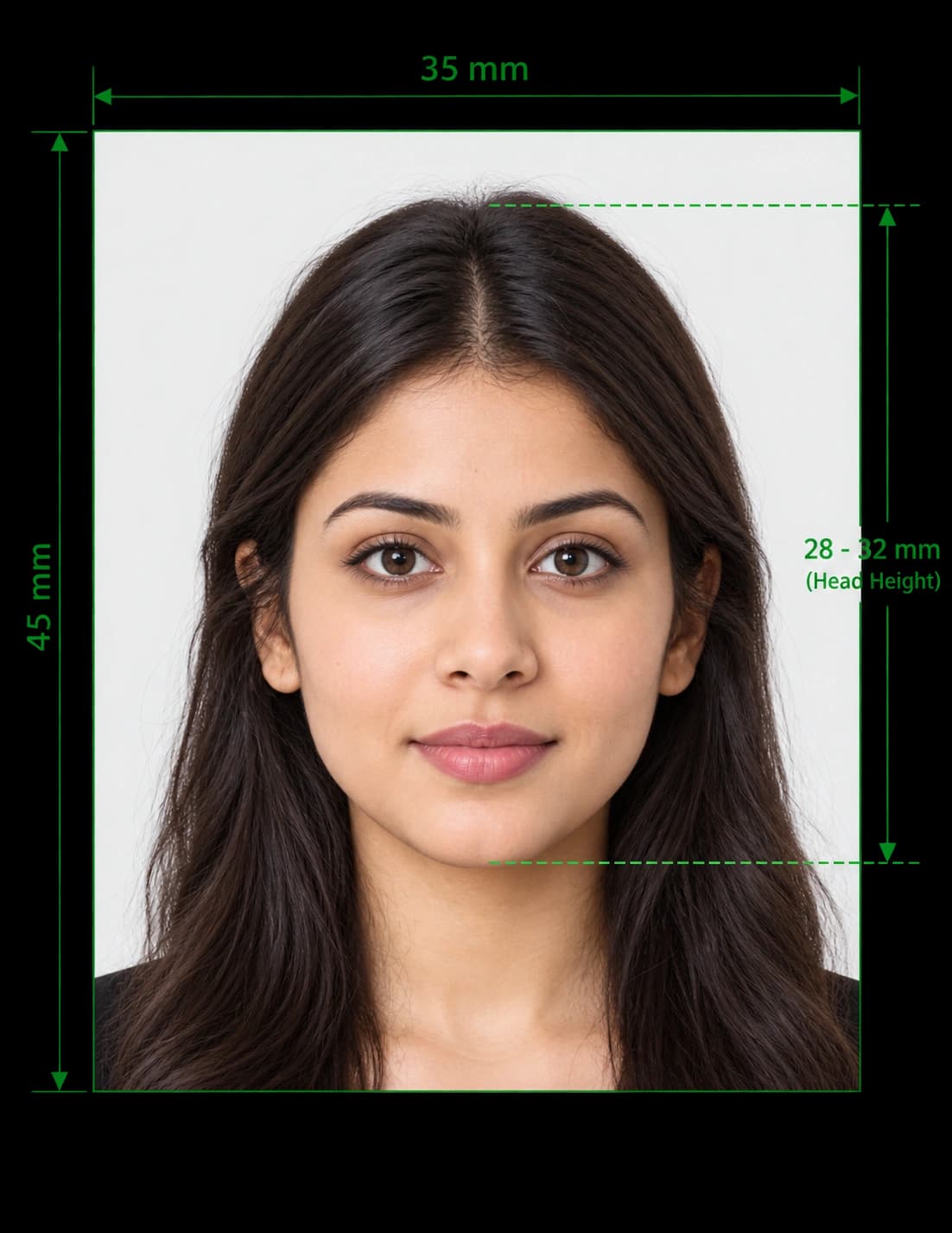
UK Passport Photo Requirements at a Glance
HM Passport Office sets the UK passport photo requirements, and it applies them to every application. Your photo must show a clear, recent and unedited likeness of you. If it breaks a rule, the office can delay or reject your application.
Read the quick summary first. The sections below explain each rule in detail.
| Requirement | Printed photo (paper application) | Digital photo (online application) |
|---|---|---|
| Size | 45 mm high × 35 mm wide | At least 600 × 750 px |
| File size | Not applicable | 50 KB to 10 MB |
| Background | Plain cream or light grey | Plain light-coloured |
| Head size | 29 mm to 34 mm, crown to chin | The online service crops it for you |
| Colour | Colour, on plain white photographic paper, no border | Colour, no filters or effects |
| Age of photo | Taken in the last month | Taken in the last month |
| Number needed | 2 identical photos | 1 photo or 1 photo code |
| Expression | Plain expression, mouth closed | Plain expression, mouth closed |
| Glasses | Not allowed unless you must wear them | Not allowed unless you must wear them |
Always compare this summary with the latest GOV.UK guidance before you apply, because the rules can change.
Check Your Photo With Our UK Passport Photo Checker
Our UK passport photo checker tests your picture against the main HM Passport Office rules before you submit it. Upload a photo, and the checker reviews these points:
- Size and format: It confirms the correct 35 × 45 mm proportions and the digital pixel minimums.
- Background: It tests for a plain, light, even background.
- Head size: It measures your head against the 29 mm to 34 mm range.
- Face position: It checks that you face forward and sit centred in the frame.
- Image quality: It flags blur, glare, shadows and red eye.
The checker helps you spot problems early. It cannot guarantee approval, because HM Passport Office makes the final decision on every photo.
UK Passport Photo Size and Dimensions
Printed Photo Size
HM Passport Office asks for printed photos that measure 45 mm high by 35 mm wide. This matches the standard UK photo booth size.
- Print two identical photos if you apply with a paper form.
- Do not cut down a larger picture. The photo must come in the correct size.
- Check booths abroad. If you use a booth outside the UK, confirm that it prints 45 mm × 35 mm.
Digital Photo Size
Online applications use digital photos with different rules.
- Width and height: The photo must measure at least 600 pixels wide and 750 pixels tall.
- File size: The file must weigh between 50 KB and 10 MB.
- Cropping: Do not crop a photo you take on your own device. The online service crops it automatically.
Head and Shoulders in a Digital Photo
When you use your own device, include your head, shoulders and upper body in the frame. This gives the service enough space to crop the picture correctly.
UK Passport Photo Head Size
The image of you must measure between 29 mm and 34 mm high, from the crown of your head to your chin. A head that looks too small or too large causes a rejection, so position yourself carefully.
UK Passport Photo Background Requirements
The background rule differs slightly between printed and digital photos.
| Photo type | Background rule |
|---|---|
| Printed photo | Plain cream or light grey |
| Digital photo | Plain light-coloured |
For both types, the background must:
- Contrast clearly with you. Avoid a background that blends into your hair or skin.
- Stay plain. Patterns, textures and objects cause rejections.
- Show no shadows. Shadows must not fall on your face or on the wall behind you.
UK Passport Photo Rules for Your Face and Pose
Pose and Expression
- Face forwards. Look straight at the camera with your head level.
- Keep a plain expression. Close your mouth and do not smile.
- Open your eyes. Keep them fully open and visible.
- Clear your hair from your eyes. Hair must not sit in front of them.
Lighting and Shadows
- Use even light. Light your face evenly from the front.
- Remove shadows. No shadows may fall on your face or behind you.
- Avoid red eye. Turn off the flash if it causes it.
Picture Quality
- Take a sharp picture. The photo must stay clear and in focus.
- Use colour. Black and white photos fail the rules.
- Skip the editing. Software must not alter your photo, and that includes filters and retouching.
Can You Wear Glasses in a UK Passport Photo?
Do not wear glasses in your passport photo unless you have to. If you must wear them, follow these rules:
- Choose clear lenses. Sunglasses and tinted glasses fail the rules.
- Show your eyes. The frames must not cover them.
- Remove glare. Reflections and shadows on the lenses cause rejections.
Take your glasses off if you can. It removes the risk of glare altogether.
Can You Wear a Hat or Head Covering in a UK Passport Photo?
You cannot wear a head covering in your photo unless you wear it for religious or medical reasons. When you wear one:
- Show your full face. Nothing may cover your face.
- Keep your eyes visible. The covering must not cast shadows on your face.
- Meet every other rule. The same background, lighting and pose rules apply.
UK Passport Photo Requirements for Babies and Children
Children follow the same size, quality and background rules as adults. HM Passport Office relaxes a few pose rules for young children. For step-by-step help, see our UK baby passport photo guide.
Children Under 6
Children under 6 do not need to look directly at the camera. They also do not need a plain expression.
Babies Under 1
Babies under 1 do not need to have their eyes open. Follow these tips for a baby photo:
- Lay your baby down. Place them on a plain, light-coloured sheet.
- Shoot from above. Take the photo looking down at your baby.
- Support the head carefully. You can hold their head with your hand, but your hand must not appear in the photo.
Rules That Apply to Every Child
- Keep your child alone in the photo. No other person may appear.
- Remove toys and dummies. Babies must not hold toys or use dummies.
Digital vs Printed Photos: Which Do You Need?
Your application method decides the type of photo.
| Digital photo | Printed photo | |
|---|---|---|
| Use it for | Online applications | Paper form applications |
| What you provide | A digital photo or a photo code | 2 identical printed photos |
| Where to get it | A booth, a shop, or your own device | A booth, a shop or a photo lab |
| Cropping | The online service crops it | You must supply the exact size |
How to Get a Digital Passport Photo
You have two options:
- Use a booth or shop. Ask for a digital photo with a code, then enter the code during your application.
- Use your own device. Take the photo during your application, with someone's help.
HM Passport Office says booth and shop photos are more likely to be approved than photos you take on your own device. Our UK digital passport photo page explains both routes.
How to Send Printed Photos
When you post a paper application, follow these steps:
- Separate the photos. Keep the two photos apart from each other.
- Leave them loose. Do not attach them to the form.
- Keep the backs clean. Write nothing on either side unless a countersignatory must sign one.
To print two exact 35 × 45 mm copies yourself, follow our guide to printing passport photos at home or use the free print template generator.
How to Take a UK Passport Photo at Home
You can take a compliant photo at home if you follow the rules carefully.
- Ask someone to help. A friend can hold the camera at eye level, and this avoids the distortion of a selfie.
- Choose a plain wall. Pick a light, plain wall with no pattern or objects.
- Face a window. Soft daylight removes shadows from your face and the wall.
- Stand back slightly. Leave room for your head, shoulders and upper body.
- Look straight ahead. Keep your head level, your mouth closed and your eyes open.
- Check the result. Upload the picture to our checker, and fix any problems before you apply.
For the full walkthrough, read our step-by-step guide on how to take a passport photo at home, or our tips for taking a passport photo on iPhone.
Common Reasons for UK Passport Photo Rejection
| Problem | How to fix it |
|---|---|
| Shadows on your face or the wall | Face a window and stand away from the wall |
| Smiling or an open mouth | Relax your face and close your mouth |
| Glasses with glare | Remove your glasses, or tilt your head slightly if you must wear them |
| Patterned or dark background | Use a plain, light wall |
| Blurry or grainy image | Hold the camera still and use daylight |
| Head too small or too large | Aim for 29 mm to 34 mm from crown to chin |
| Heavily edited photo | Retake it without filters or retouching |
| Old photo | Take a new photo within the last month |
UK Passport Photo Requirements for Renewals and Replacements
Every new passport needs a new photo, even if your appearance has not changed. The one-month rule applies to renewals, replacements and first applications alike.
Need a photo for a renewal? Use our UK passport renewal photo page, or open the main UK passport photo tool. The same photo standard applies to your UK driving licence photo.
Help With Passport Photos for Disabled People
HM Passport Office offers help for disabled applicants who struggle to take a photo. Visit the GOV.UK page on passport services for disabled people to see what support you can request.
Check Your Photo Against the UK Requirements Now
Upload your picture, run the UK passport photo checker, and fix any problems before you apply. You save time, avoid delays and give your application the best chance of approval.
Frequently Asked Questions
Everything you need to know about official UK Passport Photo Requirements Tool and Checker requirements and specifications.
What are the UK passport photo requirements?
Your photo must be recent, in colour and unedited. It must show your face clearly against a plain light background. Printed photos measure 45 mm × 35 mm, and digital photos need at least 600 × 750 pixels.
What size is a UK passport photo?
A printed UK passport photo measures 45 mm high by 35 mm wide. A digital photo must measure at least 600 pixels wide and 750 pixels tall.
What is the head size for a UK passport photo?
Your head must measure between 29 mm and 34 mm high, from the crown to the chin.
What colour background do I need for a UK passport photo?
Printed photos need a plain cream or light grey background. Digital photos need a plain light-coloured background. Avoid patterns, objects and shadows in both cases.
Can I smile in a UK passport photo?
No. Keep a plain expression with your mouth closed. Children under 6 do not need to follow this rule.
Can I wear glasses in a UK passport photo?
Avoid glasses where you can. If you must wear them, choose clear lenses, and make sure frames, glare and reflections do not hide your eyes.
Can I wear a hat or headscarf in a UK passport photo?
You can wear a head covering only for religious or medical reasons. It must not hide your face or cast shadows on it.
How recent must my UK passport photo be?
Take your photo within the last month. This rule applies to digital and printed photos.
How many passport photos do I need?
You need two identical printed photos for a paper application. For an online application, you need one digital photo or one photo code.
Can I take my own UK passport photo?
Yes. For an online application, you can take the photo on your own device with someone's help. Booth and shop photos have a higher approval rate, though.
Can I crop my own digital passport photo?
No. Do not crop a photo you take on your own device, because the online service crops it for you.
Can I edit or filter my UK passport photo?
No. Software must not alter your photo. Filters, retouching and background effects can lead to rejection.
What are the rules for a baby passport photo?
Your baby must appear alone, with no toys or dummies. Babies under 1 do not need open eyes. You can support your baby's head, but your hand must not appear in the photo.
Do I need a new photo for a passport renewal?
Yes. You need a new photo every time you get a new passport.
What is a photo code?
A photo code links a digital photo from a booth or shop to your online application. You enter the code during your application.
Can a photo checker guarantee my photo will pass?
No. A checker helps you catch common mistakes, but HM Passport Office makes the final decision.
Ready to create your UK Passport Photo Requirements Tool and Checker?
Prepare your photo using UK passport photo requirements and review it before submitting your application.
Upload Photo & Create Now